An enterprise browser is a secure, managed web browsing environment designed for small, midsized, and large businesses. It enforces security policies, manages user activity, and isolates browsing to protect sensitive data. Secure browsers provide IT teams with controls to oversee browsing and integrate with existing systems for seamless security and productivity.
Key Points
Definition: A secure enterprise browser is a managed browser that helps businesses protect data, control access, and enforce security policies.
Not just for enterprises: Small and midsize businesses can also use secure browsers to strengthen security without adding heavy infrastructure.
Why it matters: As more work happens in browsers, SaaS apps, and unmanaged devices, browser-level security has become more important.
How it helps: Secure browsers support use cases like BYOD, contractor access, phishing prevention, and protecting sensitive data in web and AI tools.
What to look for: The best secure enterprise browser should combine strong protection, easy management, and a familiar user experience.
Secure Enterprise Browsers Aren’t Just for Large Enterprises
Small and midsize businesses face many of the same browser-based risks as large enterprises. A secure enterprise browser can help smaller organizations apply browser-level controls without requiring the cost or complexity of full VDI or heavy device management. For growing businesses with lean IT teams, this can make browser security more practical to deploy and easier to manage.
How Do Enterprise and Consumer Secure Browsers Differ?
Enterprise secure browsers and consumer secure browsers both aim to protect users, but they have very different roles. Consumer secure browsers protect the individual. Enterprise secure browsers protect the organization.
Consumer secure browsers are built for individuals who want to browse privately and block online threats. They focus on features like ad-blocking, tracker prevention, and phishing protection. This helps keep personal browsing sessions safe and private. Enterprise secure browsers are designed for businesses that need dedicated tools to manage browsing activity and security.
Secure browsers let IT teams set policies, monitor activity, and integrate with company systems. They keep work data separate from personal use and reduce the chance of data leaks. Plus, they support identity checks and session control to protect sensitive data and applications.
What Created The Need For Secure Enterprise Browsers?
Work has changed. Most employees now spend nearly all of their time in the browser, accessing SaaS applications and cloud services. This shift left businesses exposed because the browser was never designed to manage security on its own.
Over 85% of daily work is conducted through the browser.
42% of employees are expected to work outside of the office in some capacity.
98% of organizations report policy violations involving BYOD devices, and 53% feel unprepared to address security issues stemming from unmanaged devices.
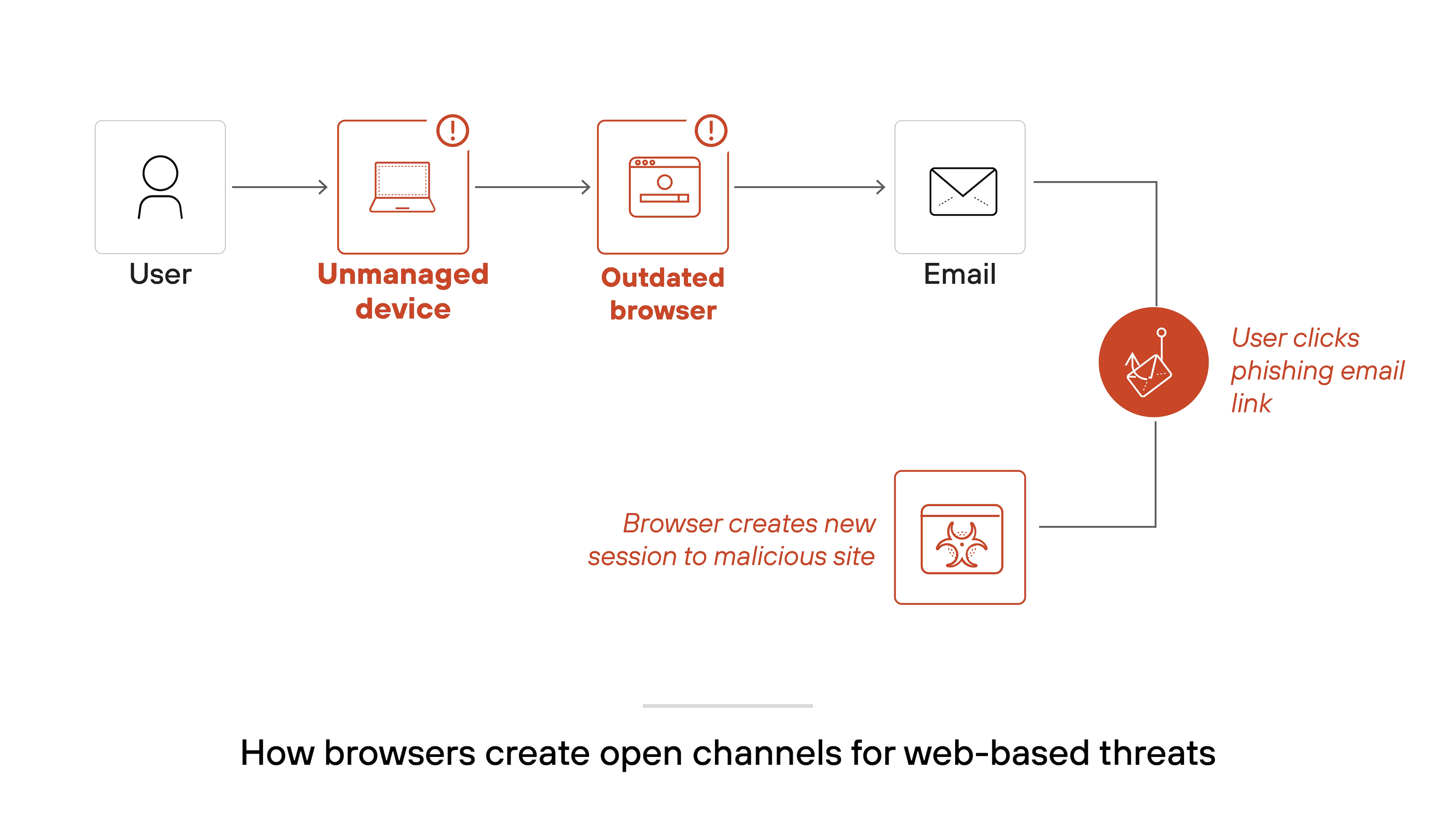
The shift in daily operations, driven by the increase in remote work and the use of unmanaged devices like personal laptops and phones, has permanently changed the security landscape. At the same time, threats have evolved. Attackers target the browser directly, using phishing, ransomware, and web-based attacks.
Legacy security models, which focused solely on protecting corporate networks and managed devices, are no longer adequate. They failed to account for this growing reliance on unmanaged environments and the need to secure connections for third-party vendors and contractors. Enterprise browsers emerged to fill a critical gap that traditional security tools couldn't cover.
Data is constantly at risk, especially when users rely on personal devices that lack enterprise-level protection. This new environment created a gap.
Nearly half (44%) of the security incidents Unit 42 investigated involved a web browser as a key conduit for threats.
These included phishing, malicious redirects, and malware downloads exploiting the browser session without adequate detection or blocking.
Attackers exploit gaps in browser-level security to pivot to other targets, leveraging these sessions for further compromise.
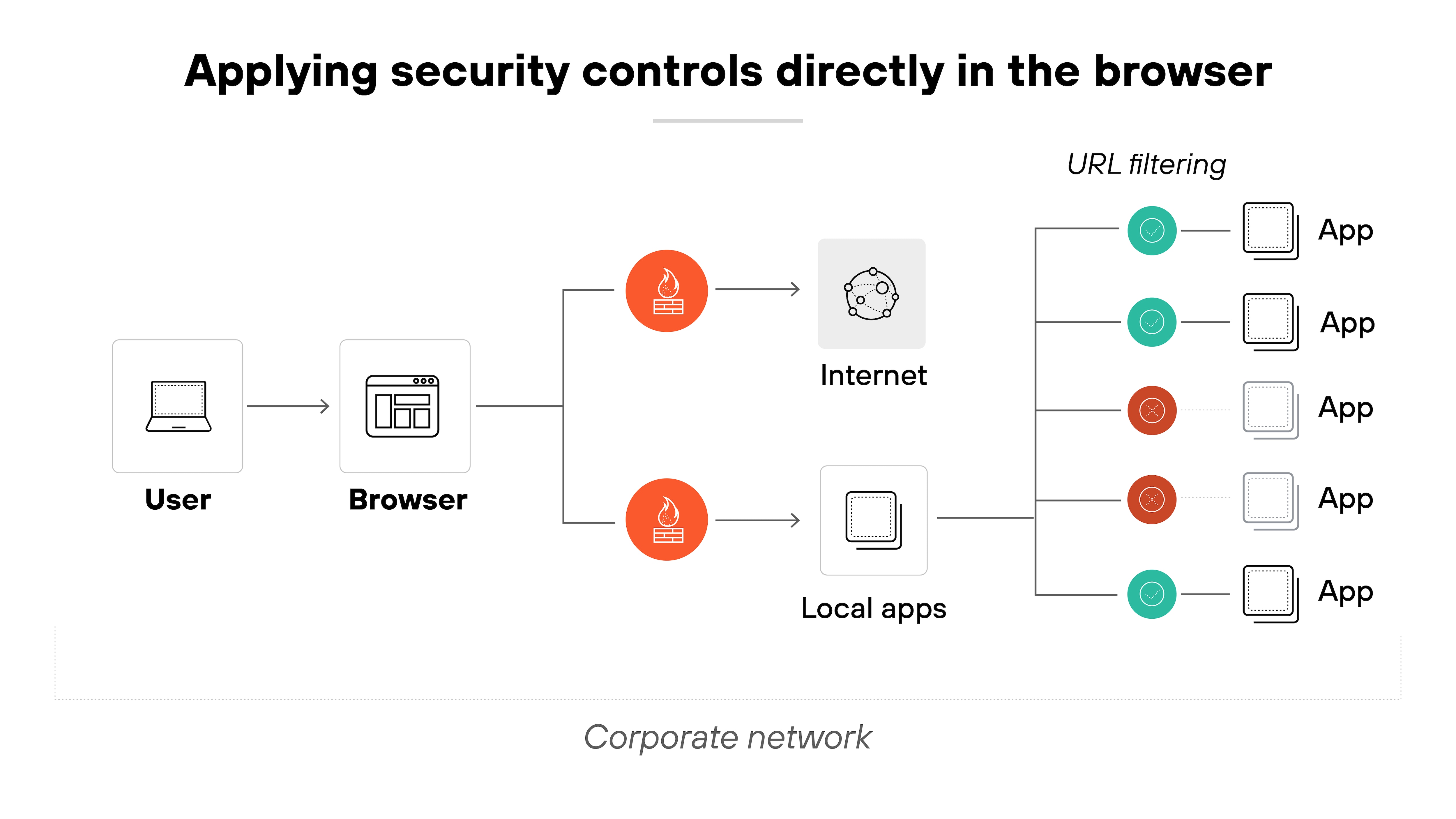
It became clear that businesses needed a better way to secure the browser itself. Not just the network around it. Secure enterprise browsers address this challenge by bringing critical security and management functions directly into the browser. This ensures that every interaction, whether on a corporate laptop or an unmanaged device, stays within a controlled and secure environment.
Why Secure Enterprise Browsers Matter to Small Businesses:
Small businesses may not have large security teams, but they still depend on browsers for email, SaaS apps, financial systems, collaboration tools, and customer data. That means a browser-based attack or data leak can create outsized disruption. A secure browser helps smaller organizations reduce risk at the point where work happens most, especially when employees use personal devices, work remotely, or connect to business apps from outside the office.
How Do Secure Enterprise Browsers Work?
An enterprise browser works by enforcing security policies and managing resource access directly in the browser.
Like this:
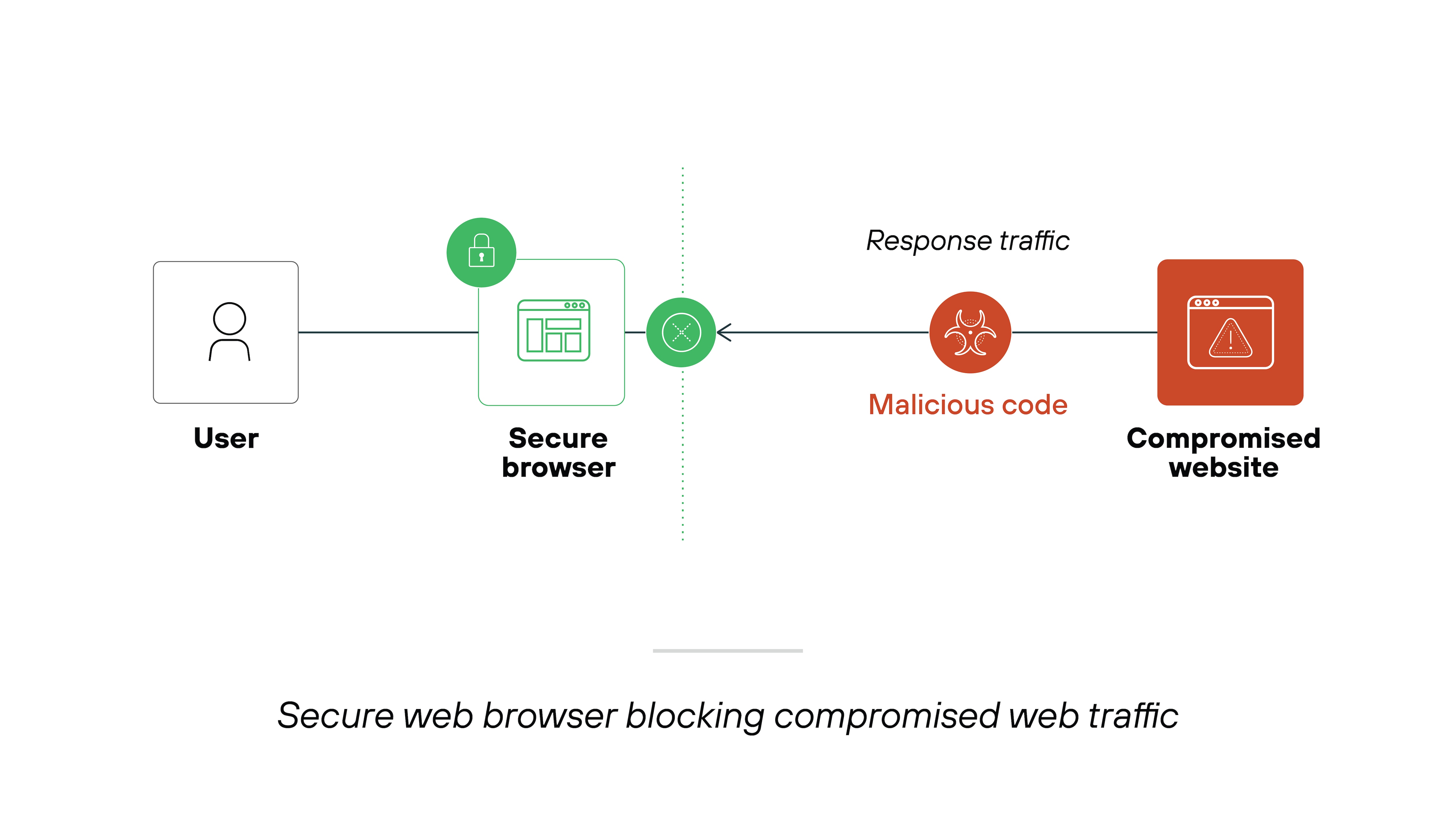
A secure browser controls and monitors user activity. This happens through rules like content inspection and access control. Web processes are isolated, which means sensitive data stays protected in a controlled environment.
Separating corporate and personal browsing helps maintain security and user privacy. Also, most enterprise browsers allow for some level of customization to align the browser with an organization's branding.
What Are the Use Cases for Secure Enterprise Browsers?
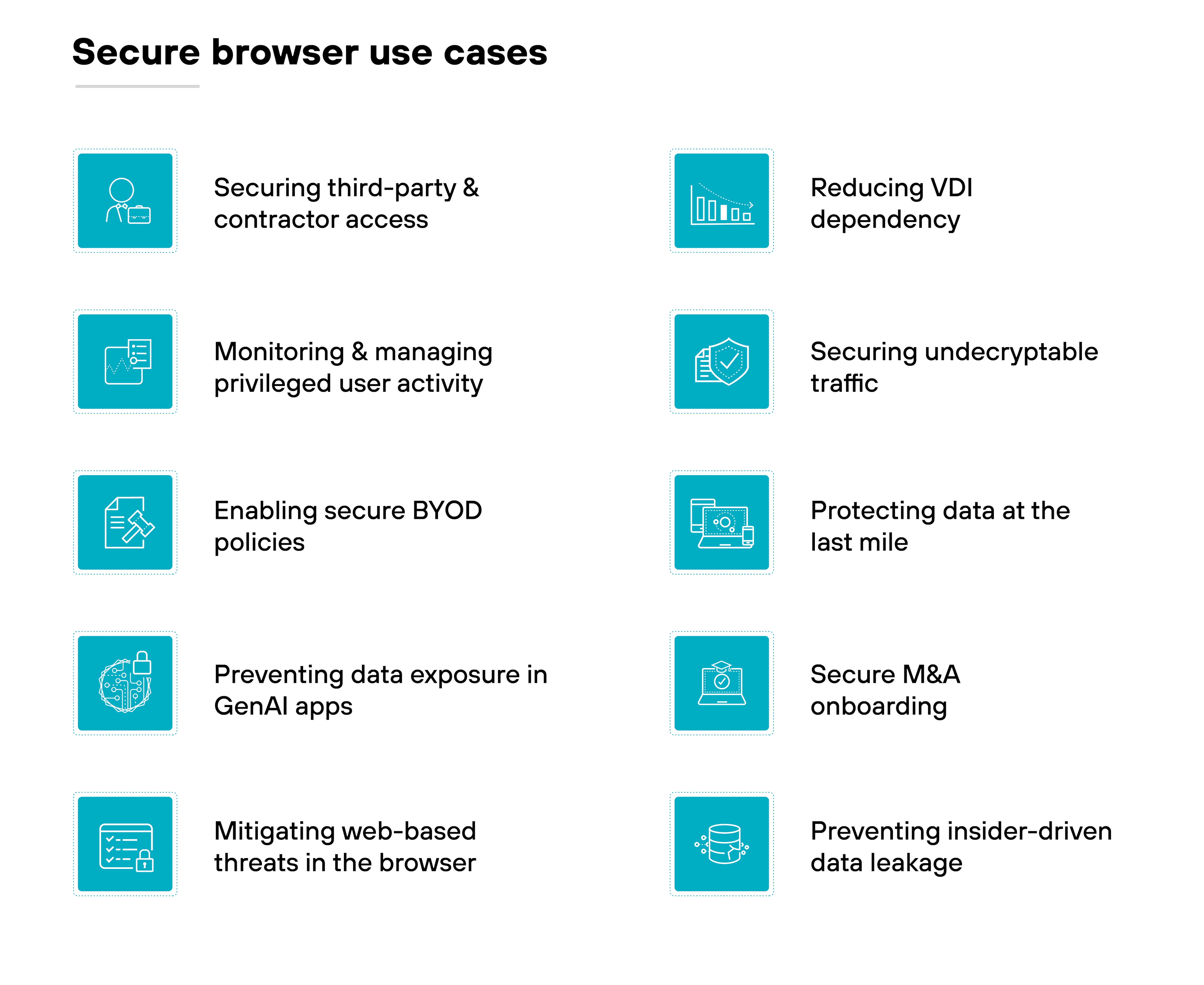
Secure browsers are designed to address security and productivity challenges in a way that aligns with the modern work environment, tackling a range of use cases that conventional security tools often fall short on. The following real-world scenarios demonstrate the unique capabilities of a secure enterprise browser:
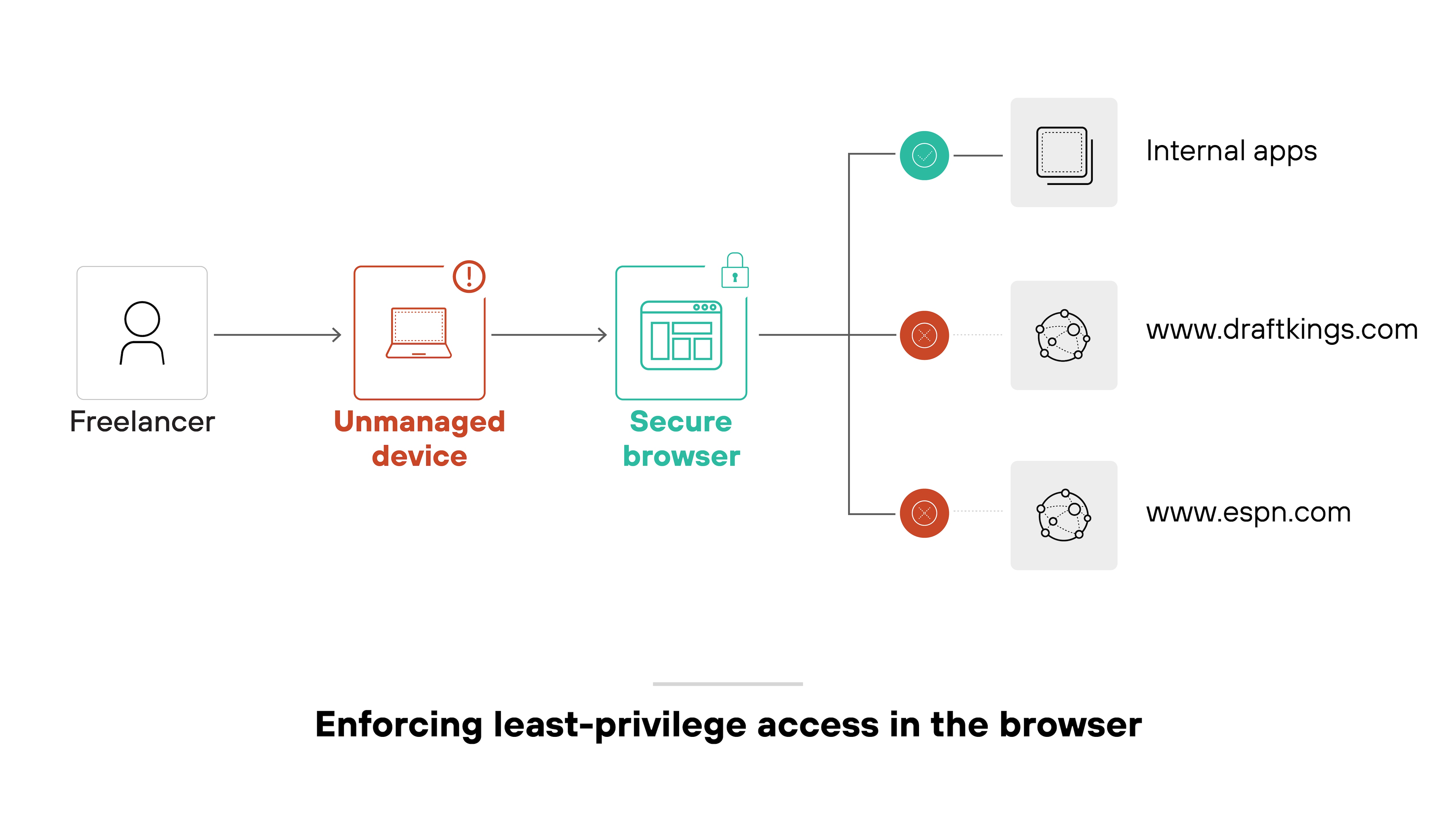
Securing third-party and contractor access: For small to medium-sized businesses (SMBs) utilizing agencies, freelancers, or outsourced support, independent workers often use unmanaged devices. A secure enterprise browser allows organizations to enforce access policies without requiring full device management, a particularly valuable capability for managing third-party access.
Monitoring and managing privileged user activity: Privileged accounts have elevated access that makes them high-value targets. With session monitoring and in-browser controls, security teams can keep critical activities in check.
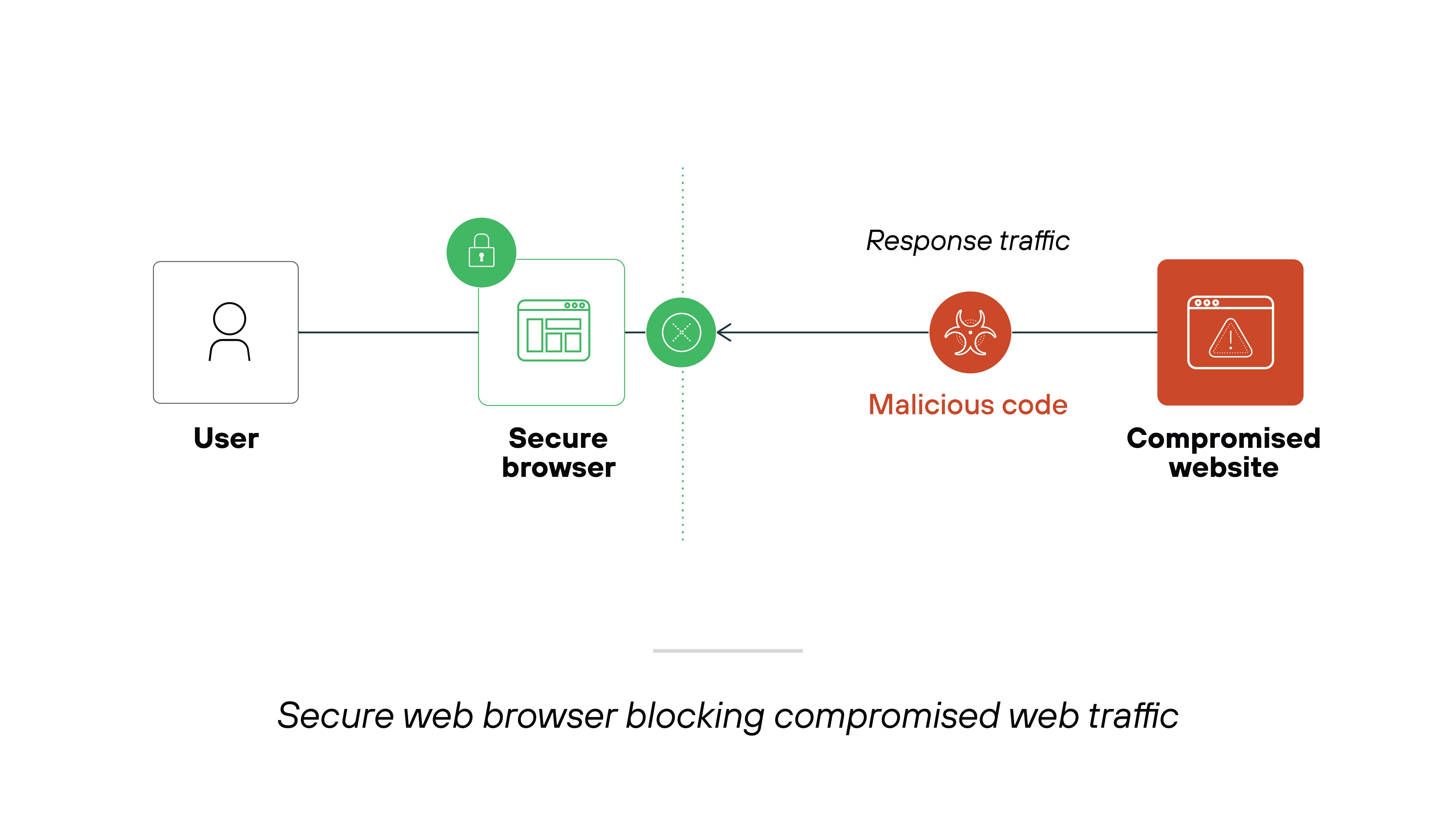
Mitigating web-based threats in the browser: The browser is a common entry point for phishing, malware, and other attacks. Built-in threat prevention features help block dangerous sites and risky behavior at the point of use.
Enabling secure BYOD policies: Bring-your-own-device programs increase flexibility but also expand the attack surface. A secure browser applies controls directly in the browser environment, helping to reduce exposure without interfering with the device. This helps SMBs support flexibility without fully managing every device.
Preventing data exposure in GenAI apps: Users may unintentionally enter sensitive data into AI tools like ChatGPT. Browser-level inspection can detect and restrict these actions in real time, before the data leaves the organization.
Preventing insider-driven data leakage:Insider threats—whether intentional or accidental—remain a persistent risk. Fine-grained browser policies help limit data movement and reduce the likelihood of exfiltration from within.
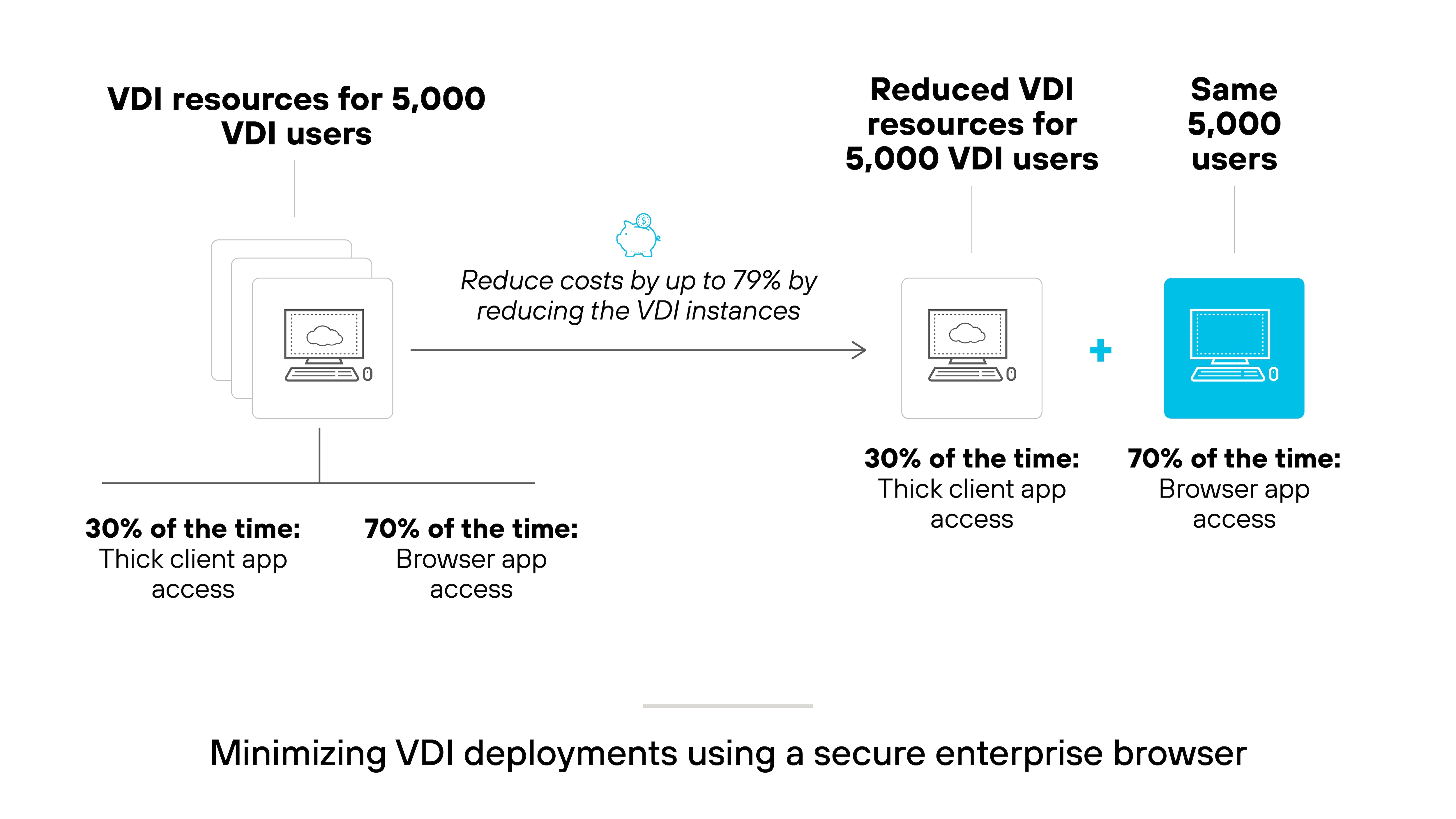
Reducing VDI dependency: Not all users need full desktop virtualization. For those who mainly access web apps, a secure browser can deliver the necessary security controls without the complexity and cost of VDI. Smaller organizations can secure browser-based work without taking on the cost and overhead of full desktop virtualization.
Protecting data at the last mile: The browser is often the final point where data is accessed or transferred. Controls like watermarking, masking, and session isolation help protect sensitive information right where it's most exposed.
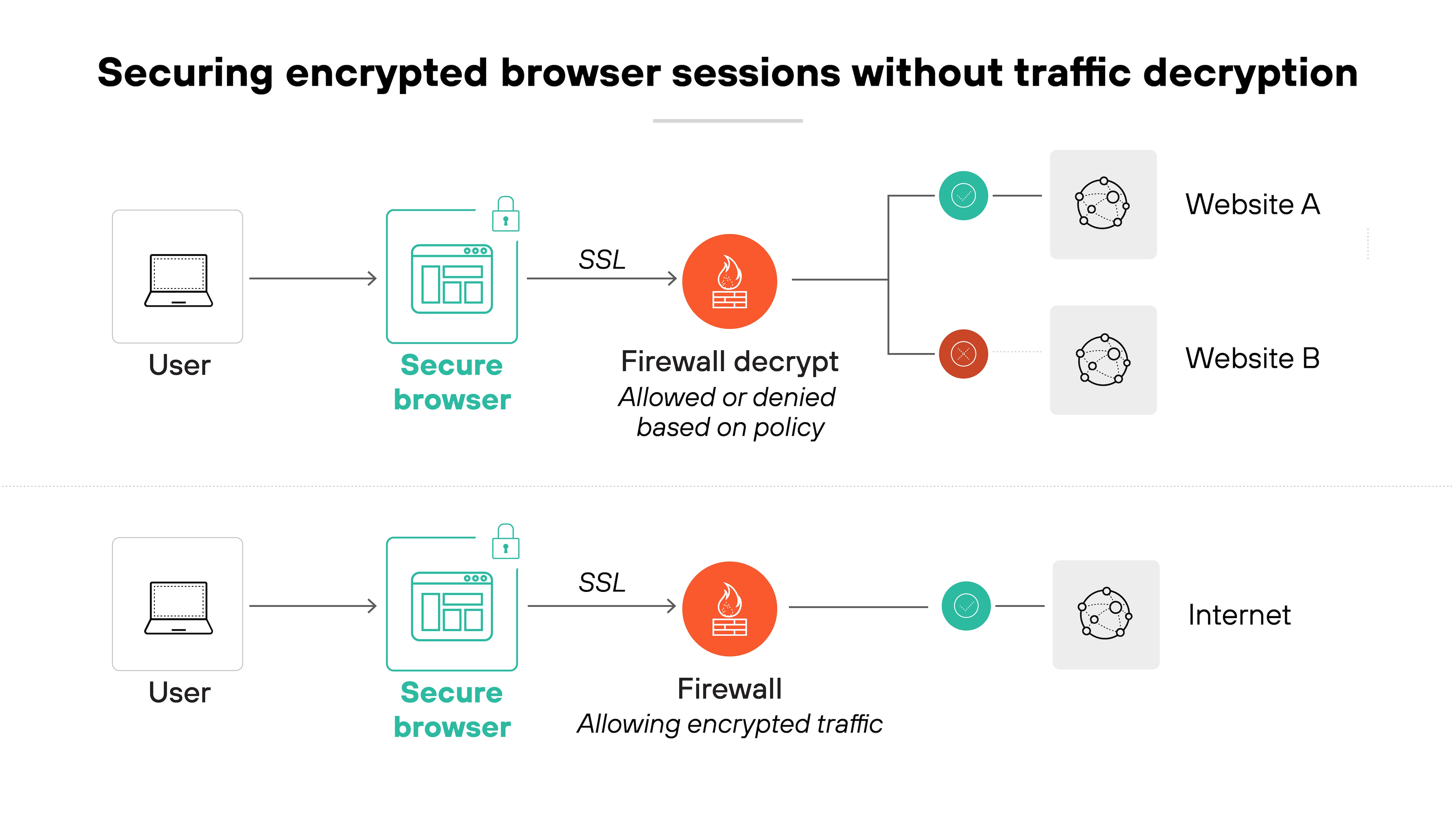
Securing undecryptable traffic: Some browser traffic, like QUIC or certain Microsoft 365 flows, can't be decrypted by network tools. Secure enterprise browsers apply enforcement directly, eliminating the need for decryption.
Securing M&A onboarding: During mergers and acquisitions, users often need immediate access to sensitive systems and data. Secure enterprise browsers provide controlled access across managed and unmanaged devices to support fast onboarding without increasing risk.
Secure Browser Use Cases for Small and Midsize Businesses
Secure enterprise browsers are especially useful for small and midsize businesses that need stronger security without adding complex infrastructure. Common SMB use cases include:
Securing contractor or freelancer access to internal apps
Protecting business SaaS access on employee-owned devices
Reducing phishing and malware risk in browser sessions
Limiting sensitive data exposure in GenAI tools
They can also help growing companies reduce reliance on heavier remote access models when most work happens in the browser.
What Are The Primary Features Of Secure Enterprise Browsers?
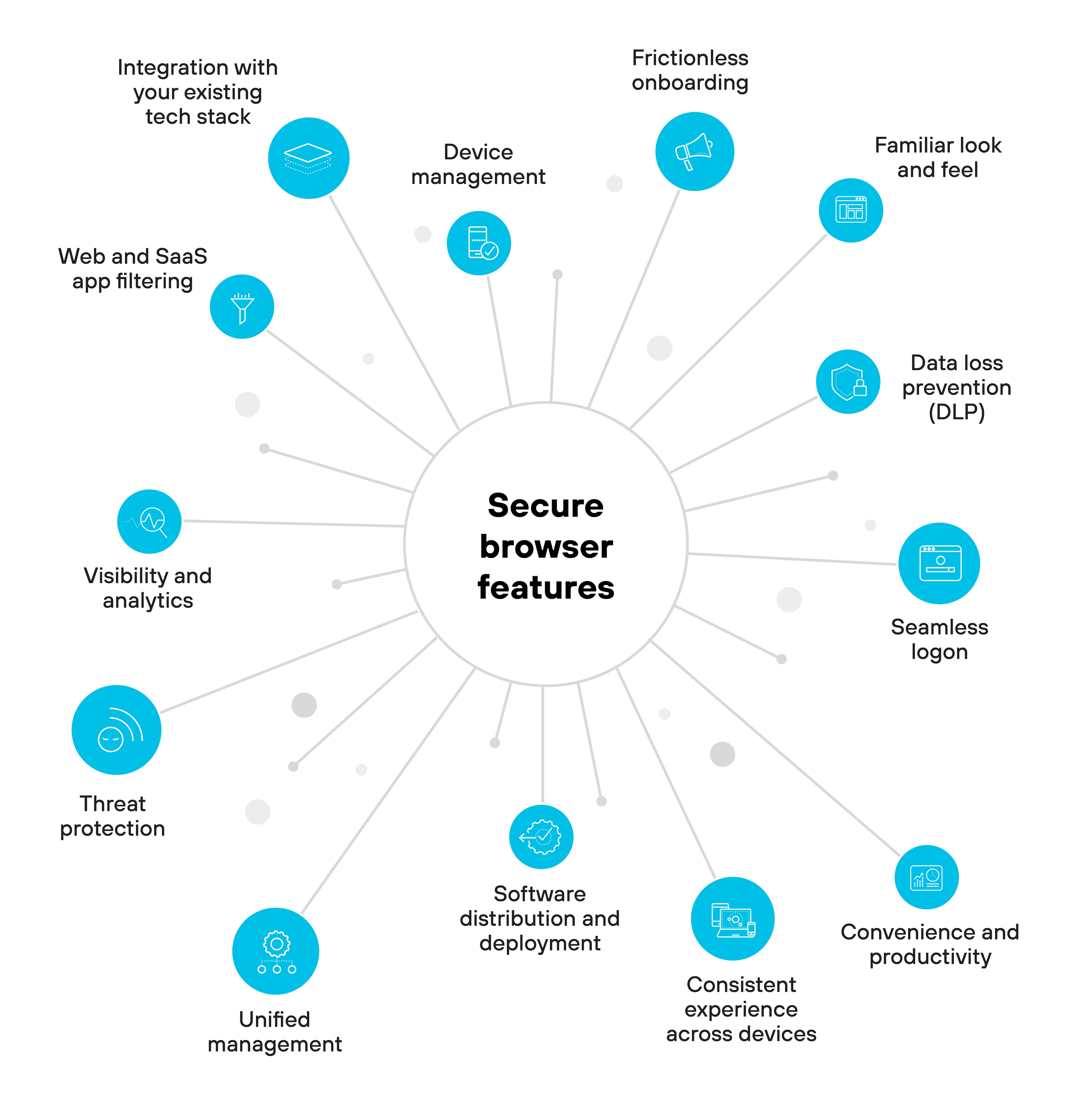
Secure enterprise browsers are designed with a set of core features that make them a reliable choice for managing web access and user activity. These features address risks, support compliance, and help align browsing activity with organizational policies.
Primary features that organizations can expect to find in most secure enterprise browsers include:
Threat protection: Protects against phishing, malware, data exfiltration, and other threats. Most secure browsers can integrate with threat intelligence databases and apply zero trust policies directly in the browser.
Device management: Tracks the devices where the browser is installed, checks device health, and enables access revocation when needed.
Web and SaaS app filtering: Controls which sites and applications users can reach, limiting exposure to shadow IT and enforcing app-level restrictions.
Frictionless onboarding: Installs and updates with minimal user input, so new users can get started quickly and securely.
Familiar look and feel: Delivers a Chromium-based experience to reduce user training and ease the transition from consumer browsers.
Seamless logon: Integrates with SSO and identity providers to simplify authentication and reduce password fatigue.
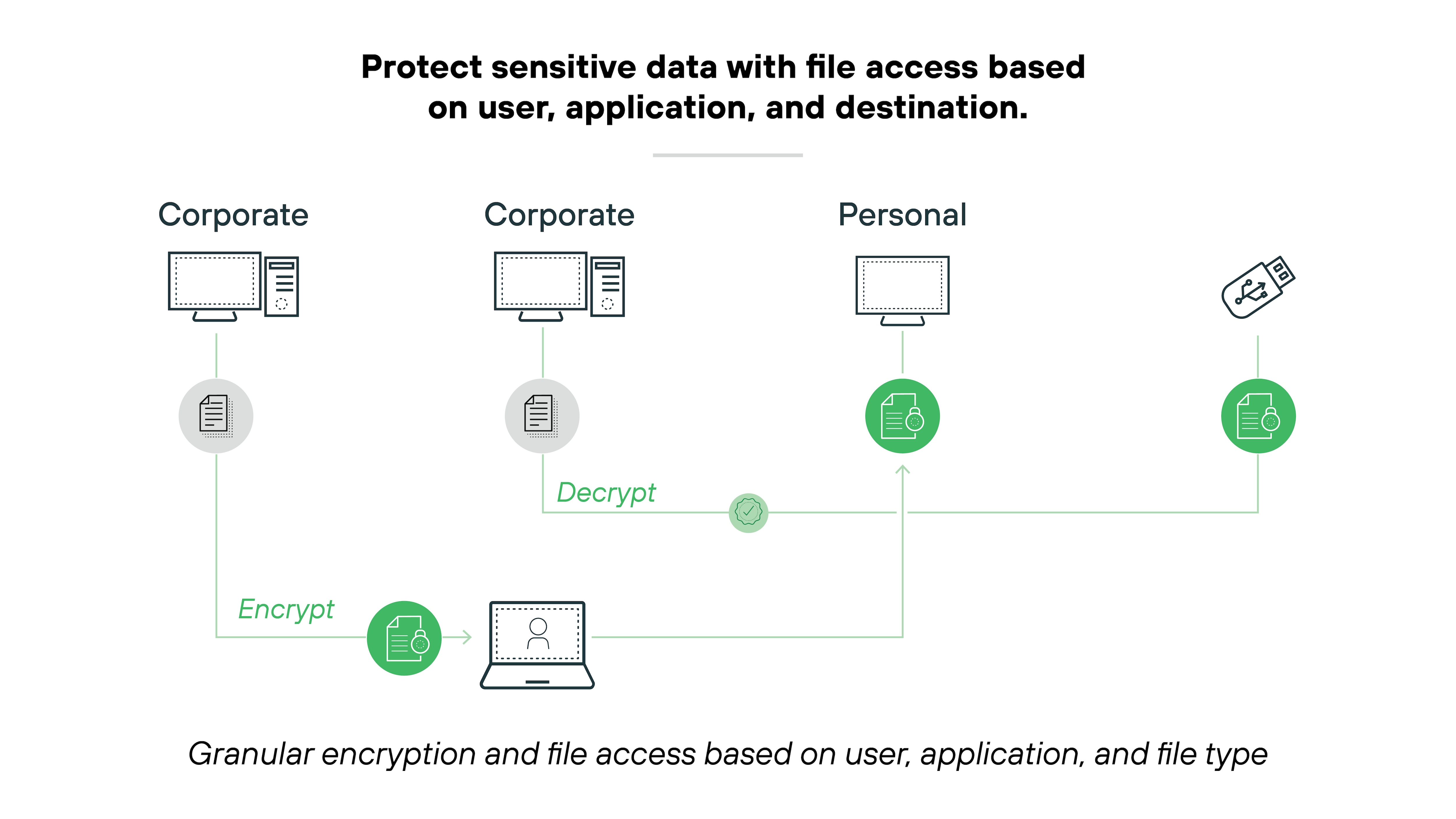
Data loss prevention (DLP): Enforces DLP rules in the browser, including blocking uploads, restricting screenshots, and applying watermarks.
Consistent experience across devices: Maintains the same interface and behavior on desktops and mobile devices to support productivity.
Convenience and productivity: Supports bookmarks, shortcuts, and smooth performance to reduce friction in everyday tasks.
Software distribution and deployment: Supports management tools like SCCM and MDM for scalable rollout and updates.
Unified management: Applies centralized policies across all users, reducing drift and simplifying policy enforcement.
Integration with the existing tech stack: Works with existing security tools and infrastructure to ease adoption and maximize visibility.
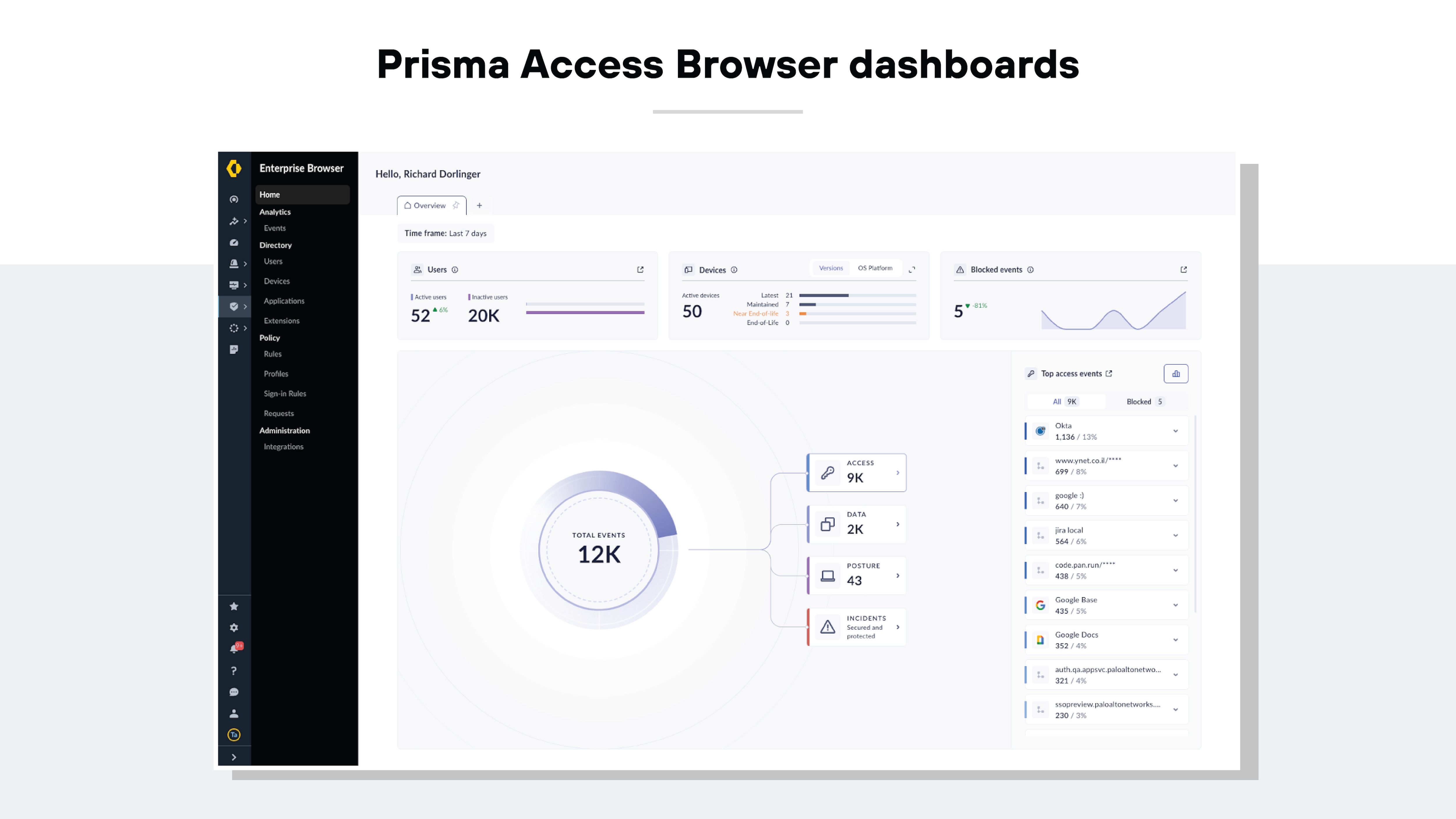
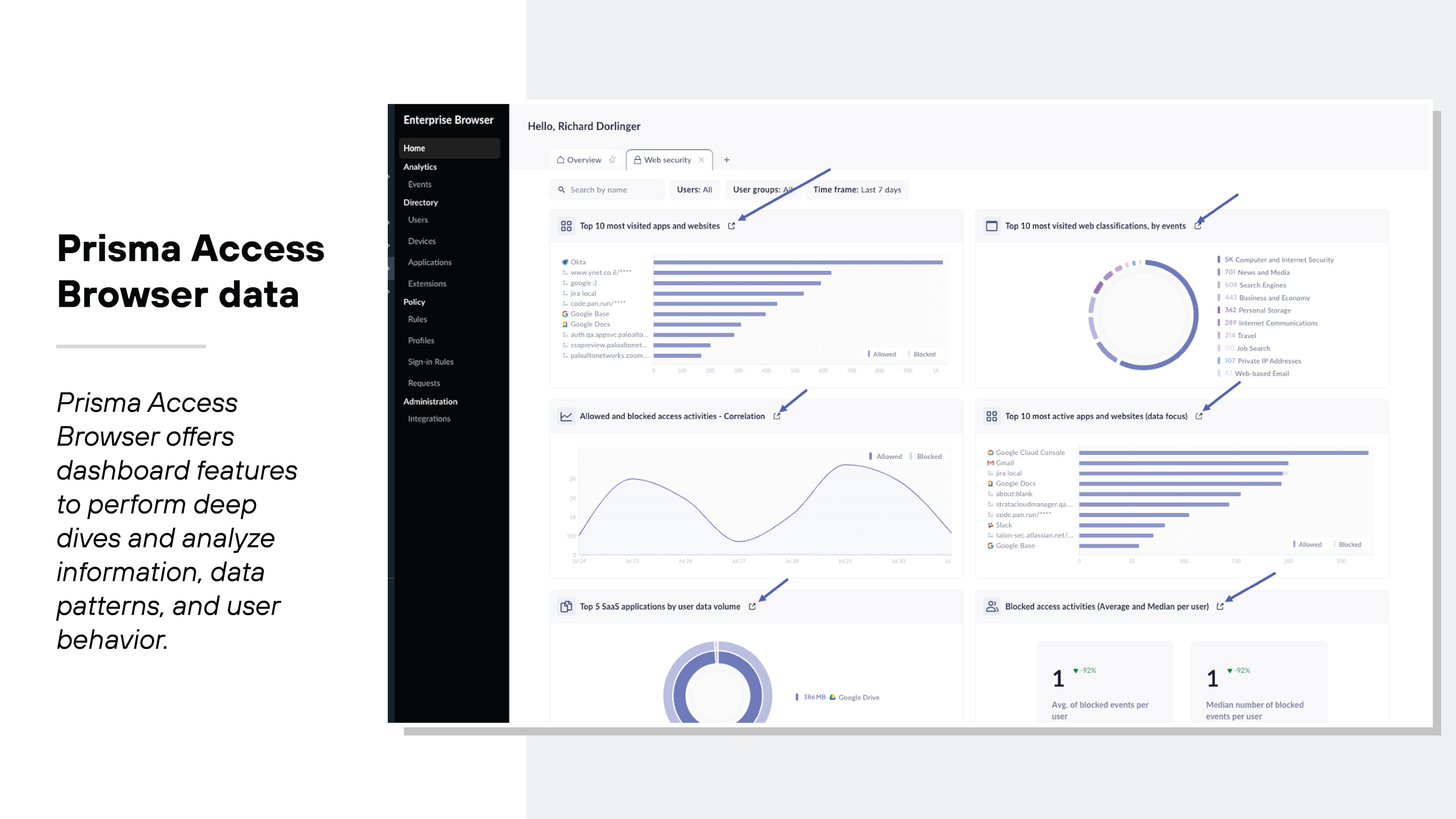
Visibility and analytics: Provides detailed browser-level activity logs to help teams monitor usage, detect risk, and support compliance efforts.
What Are the Benefits of Secure Enterprise Browsers?
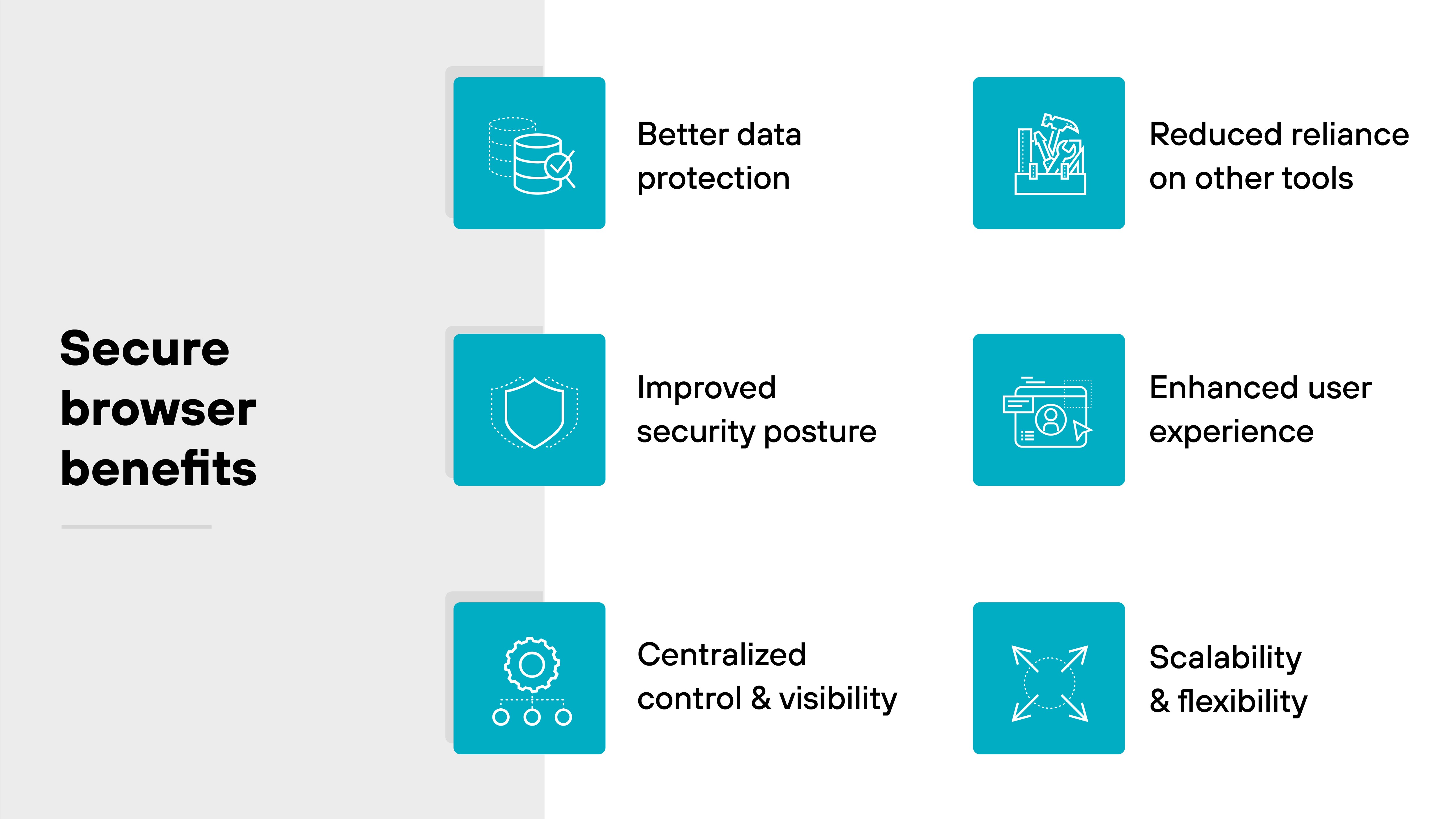
Secure enterprise browsers offer organizations a comprehensive solution to safeguard sensitive data, enhance visibility, and maintain user productivity. Their advantages are multifaceted: some are widely recognized, such as controlling high-risk activities and protecting data precisely where it is used.
Other benefits specifically address the complexities of modern working environments, like ensuring secure web access even on unmanaged personal devices and minimizing the reliance on other remote access tools.
Additional details include:
Better data protection: Secure enterprise browsers apply data loss prevention controls at the point of use. This helps keep sensitive information secure.
Improved security posture: These browsers extend zero trust policies and integrate threat detection directly in the browser. Which means: they protect against malware, phishing, and account takeovers.
Centralized control and visibility: Administrators get a single place to manage security policies and user activity. Which makes it easier to maintain oversight.
Reduced reliance on other tools: Secure enterprise browsers can take on some tasks typically handled by VPNs, VDI, or separate endpoint tools. The consolidation simplifies security operations.
Enhanced user experience: Secure browsers also give users a familiar and consistent workspace, helping to reduce friction and support productivity.
Scalability and flexibility: Deployment across both managed and unmanaged devices allows organizations to support a dynamic workforce without weakening security.
Secure Browser Benefits for Small and Growing Businesses
For small and growing businesses, the value of a secure enterprise browser is often operational as much as technical. It can help lean teams gain better visibility into browser activity, apply security policies more consistently, and protect access to SaaS applications without layering on unnecessary infrastructure. That makes it easier to strengthen security while keeping work simple for employees, contractors, and remote users.
When SMBs Need a Secure Browser
SMB Challenge
How a Secure Browser Helps
Employees use personal devices for work
Applies browser-level controls without full device management
Contractors need access to internal apps
Supports controlled access and session restrictions
Staff rely on SaaS tools all day
Protects browser-based workflows where work actually happens
Lean IT team has limited time
Centralizes visibility and policy management
Concern about phishing or risky downloads
Adds threat protection directly in the browser
Sensitive data may be entered into AI tools
Helps inspect or restrict risky browser activity
Secure Enterprise Browsers vs. Other Security Technologies
Secure enterprise browsers fill a focused role in the security stack by controlling and protecting activity within the browser. They are often compared to broader security frameworks, like SASE, threat isolation tools like RBI, and full virtual environments like VDI.
The following table provides a side-by-side breakdown to show how these tools align or differ across key functions:
Feature
Enterprise browser
SASE
RBI
VDI
Integration and scope
Focuses on secure web browsing. Centralizes control over web access and user activity within a browser environment.
Combines security and networking into one cloud-delivered framework. Covers a broader range of access and protection across the network.
Focuses on isolating browser sessions from the endpoint. Keeps potentially harmful web code off the user's device.
Provides full desktop virtualization. Goes beyond browsing to cover all applications and workflows.
Control and policy management
Provides detailed access controls and policy enforcement. Ensures consistent application of security policies across browsing sessions.
Provides broad security enforcement at the edge of the network. Policies apply to all traffic types, not just web browsing.
No direct management of user or application policies. Relies on remote hosting for security enforcement.
Centralizes control and policy management at the desktop level. Manages the entire OS and application environment.
Threat isolation approach
Uses in-browser isolation to contain threats within the local device. Keeps corporate and personal activities separate without external dependencies.
Not focused on browser-level isolation. Uses cloud-based traffic inspection and security filtering to manage threats.
Runs browsing sessions in a remote server. Only a safe visual stream reaches the user's device.
Uses server-hosted desktops and applications. Isolation includes all desktop activities, not just web browsing.
Security and data protection
Secures web-based data interactions and supports compliance. Helps prevent data breaches and sensitive data exposure.
Offers secure access to applications and data across hybrid environments. Adapts security policies to dynamic, distributed workforces.
Prevents web-based threats from reaching the corporate network or endpoint. Removes exposure to malicious sites or downloads.
Protects data by containing all interactions within a remote environment. Prevents endpoint exposure to threats.
User experience and access
Maintains a familiar and seamless browsing experience. Users work directly within a secured browser on their devices.
Supports consistent access and security from anywhere. Prioritizes network-level visibility and control.
User experience may be affected by latency or remote rendering. No direct control or customization within the user's device.
Provides a complete virtual desktop experience, which may be more than needed for browser-focused work.
Operational model
Operates as a local, secure browser with managed settings and controls. Works within the enterprise's environment, complementing other security layers.
Delivered as a cloud-native service. Integrates security and network services through distributed gateways.
Delivers a secure browsing experience by separating browsing from local device resources. Offloads threat management to external infrastructure.
Delivers remote desktop environments hosted on centralized servers. Requires more infrastructure and may have higher resource demands.
Enterprise Browser vs. SASE
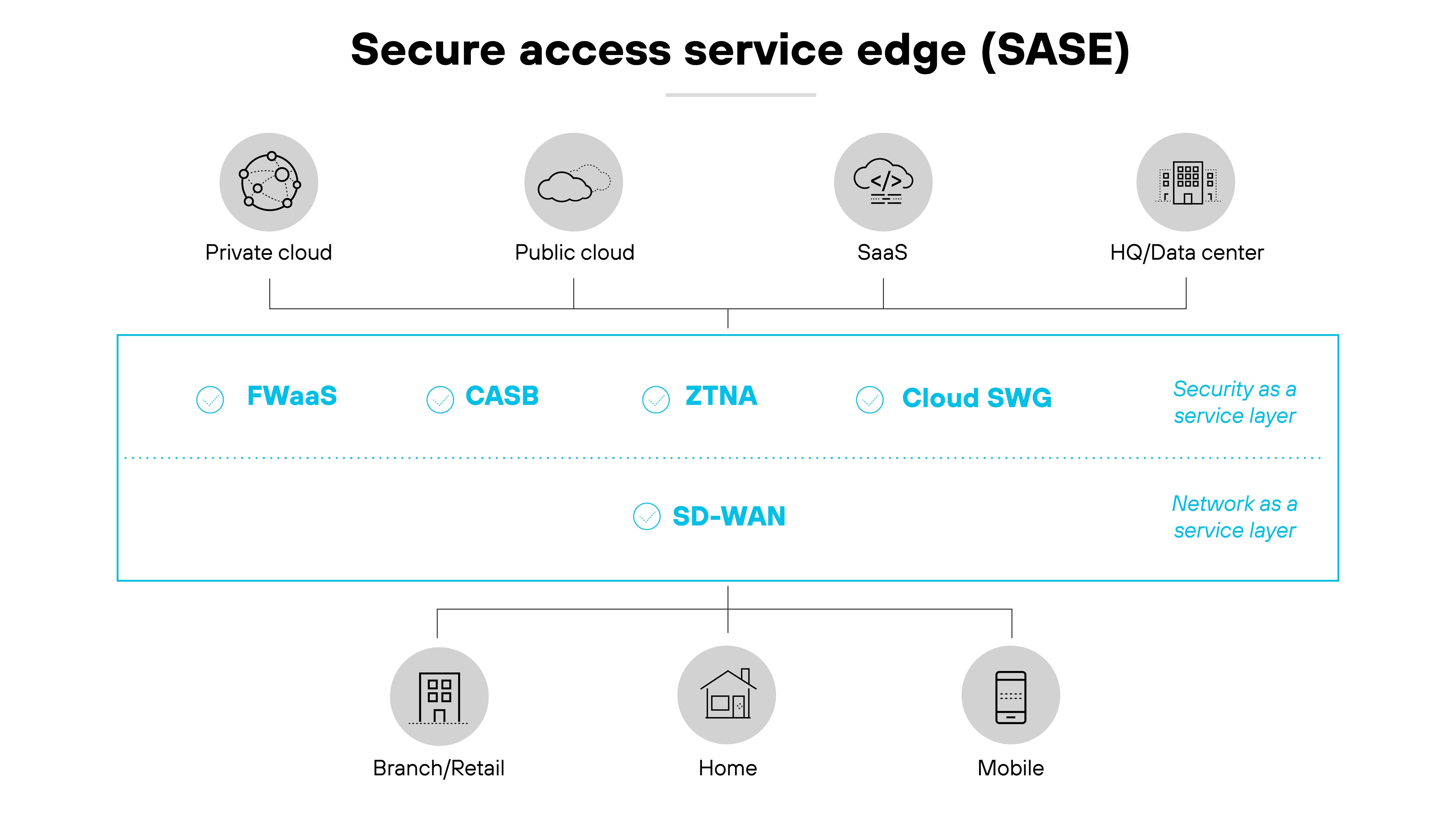
An enterprise browser focuses on managing web access within a company. Secure access service edge (SASE) extends security and networking across a dispersed workforce. When used together, they provide strong security for web use and for remote work.
An enterprise browser provides centralized management of web access, helping to secure data, support compliance requirements, and prevent data breaches by controlling web activities within an organization.
On the other hand, SASE merges networking and security into one service. It connects users to the nearest cloud gateway and helps secure access for remote and hybrid workers. SASE simplifies management and adapts to changing network and security needs.
Enterprise Browser vs. RBI
An enterprise browser and remote browser isolation (RBI) represent two distinct approaches to securing web activity.
Enterprise Browser:
Integrates deeply with existing security frameworks.
Centralizes control and compartmentalizes web activity on the user's device.
Focuses on a user-centered approach that maintains data safety and efficient daily workflows.
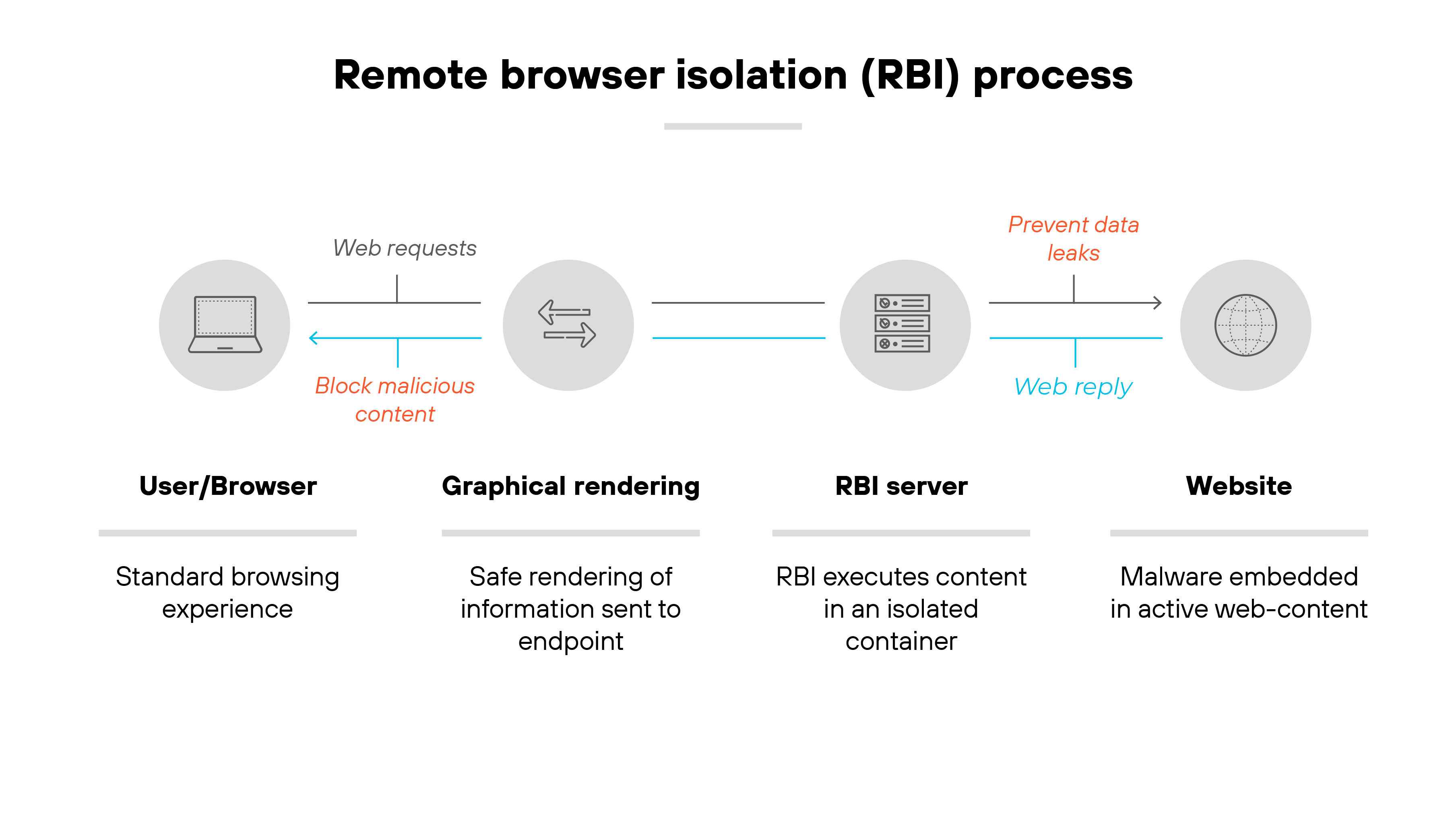
Remote Browser Isolation (RBI):
Hosts the browser on a remote server.
Transmits only a visual stream to the user's device.
Ensures harmful code remains isolated from the user's machine and the corporate network.
The fundamental difference lies in threat isolation: the enterprise browser secures data through on-device integration and control, while RBI achieves security by keeping the actual web content off the user's device entirely. Both have a valuable and unique role within a comprehensive security strategy.
A secure enterprise browser is designed to manage and secure web browsing by isolating activity within a controlled environment, thereby mitigating threats and fitting into existing organizational workflows.
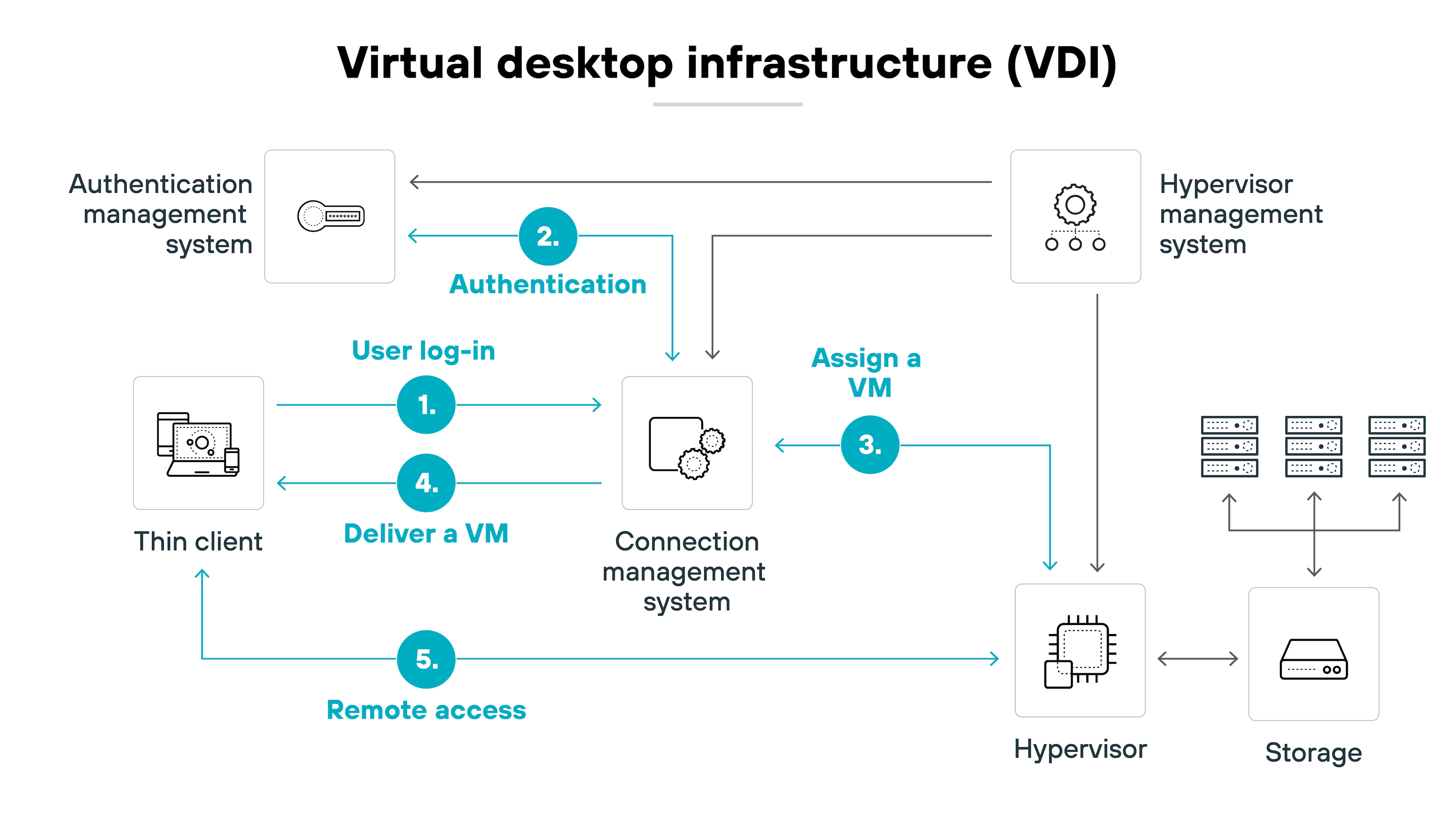
Virtual Desktop Infrastructure (VDI), in contrast, offers a full desktop experience delivered from a remote server. This approach provides comprehensive control over all desktop interactions, not just web browsing.
Ultimately, the choice between the two depends on the organization's needs: the enterprise browser is best suited for securing and controlling web activity, while VDI is the better option for organizations requiring a complete virtual workspace and full desktop access control.
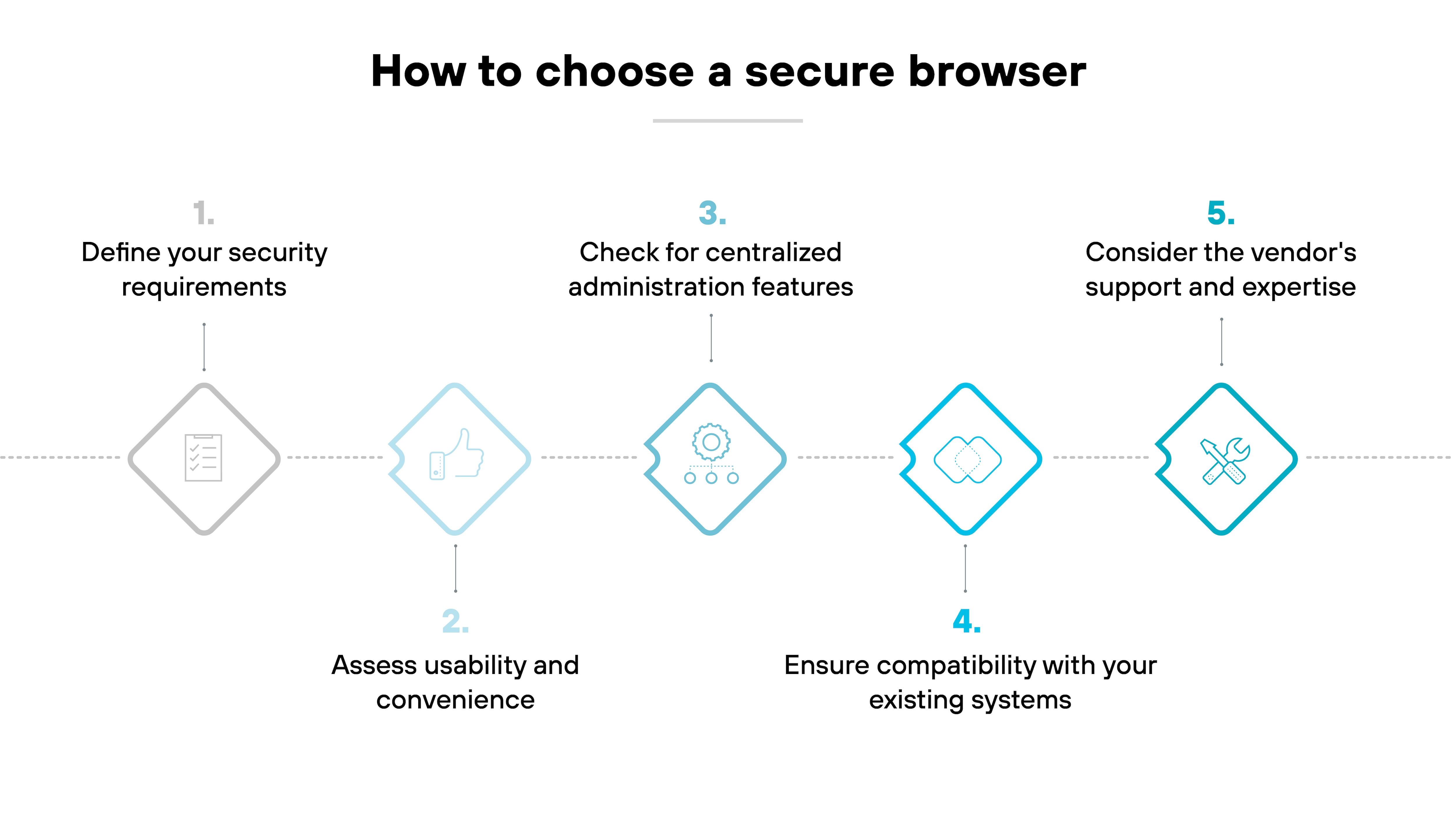
How To Choose The Secure Enterprise Browser For Your Business
Choosing the right secure enterprise browser starts with understanding what your business actually needs to protect. The best option should do more than provide a familiar browsing experience. It should help reduce risk, protect data, support employees on any device, and fit into your broader security strategy without creating unnecessary complexity.
Define Your Security Requirements
The first step is to understand the security challenges your organization faces. Prioritize features such as built-in threat protection, data loss prevention (DLP), and granular controls over web access. These capabilities are essential for protecting sensitive information and mitigating risks from both internal and external threats.
Tip:
Consider integrating threat intelligence and AI-powered phishing prevention to stay ahead of evolving browser-based attacks.
Assess usability and convenience
Choose an enterprise browser that feels familiar to users.
Choose an enterprise browser that feels familiar to users. Look for options built on Chromium. These often have the same interface and user experience as consumer browsers. Features like seamless logon, profile syncing across devices, and the ability to import bookmarks and shortcuts are also key.
Tip:
Evaluate whether the browser offers familiar workflows and frictionless sign-on options to ensure minimal disruption and smoother adoption.
Check for Centralized Administration Features
A comprehensive enterprise browser facilitates unified management for IT and security personnel. This unified approach simplifies policy administration and user onboarding, and provides comprehensive visibility into user activities. Such centralized tools are essential for consistently enforcing security policies and enabling rapid incident response.
Tip:
Prioritize a solution that provides a unified, single-pane-of-glass management interface to make policy enforcement easier.
Ensure Compatibility with Your Existing Systems
Evaluate how the browser integrates with current security tools, identity management systems, and endpoint software. This minimizes complexity and allows organizations to leverage existing investments.
Tip:
Look for native integration with your identity and Zero Trust solutions to reduce deployment friction and improve security posture.
Consider the Vendor Support and Expertise
Choose a vendor with strong technical support and a good reputation in the industry. Be certain your IT or security team can get help when needed, and that the browser aligns with your long-term security and operational goals.
Tip:
Opt for a vendor with proven success in secure browsing and recognized by independent analysts for offering reliable technical support.
What Small Businesses Should Prioritize
Small businesses should prioritize:
Ease of deployment
Simple administration,
Identity integration
Controls that protect browser-based work without creating friction for users
A secure browser should feel familiar, work well with existing tools, and give smaller IT teams a manageable way to secure SaaS access, remote work, and unmanaged devices.
An enterprise web browser is a secure, customizable browser designed for use within organizations, offering enhanced management, compliance, and consistent security posture features to support business operations and protect sensitive data.
Enterprise web browsers often provide more robust security capabilities compared to other browser security solutions like plugins or extensions. They are built with enterprise security needs in mind, offering advanced protection against threats, customizable security protocols, and integration with broader enterprise security systems.
Companies adopt enterprise browsers to boost agility, enabling secure access from unmanaged devices without sacrificing security. These browsers facilitate control over employee website access, ensuring compliance, and offering a uniform browsing experience. By balancing protection with productivity, enterprise browsers safeguard sensitive data while promoting organizational efficiency.
Enterprise browser security is designed to elevate productivity, not hinder it. It streamlines onboarding, allowing contractors to quickly adapt and begin working securely. The support for BYOD policies means employees can use their devices of choice, ensuring comfort and familiarity that lead to efficiency. With a focus on security and compliance, enterprise browsers provide a secure, controlled environment that reduces the risk of incidents, ensuring workflows remain uninterrupted.
Enterprise browsers (EBs) and security service edge (SSE) are compared because both aim to enhance security and manage access within an organization. EBs focus on secure browsing, while SSE provides a broader security framework including access control, threat protection, and data security across all cloud services and applications.
A “secure browser” typically refers to a consumer-grade tool designed to protect individual users from threats like trackers and phishing. An “enterprise browser” is an enterprise-grade tool with centralized security, policy enforcement, and administrative control. It’s built for business use, not personal browsing.
No. Small and midsize businesses can also benefit from secure browsers, especially when employees rely on SaaS apps, work remotely, use unmanaged devices, or collaborate with contractors.
Yes. If most work happens in web apps and SaaS platforms, a secure browser can help add browser-level protection without requiring full desktop virtualization.
Because many business-critical activities now happen in the browser, including email, collaboration, HR, finance, and customer-facing SaaS tools. That makes the browser a key point for both productivity and risk.