Search
Table of Contents
-
What Is a Secure Enterprise Browser?
- Secure Enterprise Browsers Aren’t Just for Large Enterprises
- How Do Enterprise and Consumer Secure Browsers Differ?
- What Created The Need For Secure Enterprise Browsers?
- How Do Secure Enterprise Browsers Work?
- What Are the Use Cases for Secure Enterprise Browsers?
- What Are The Primary Features Of Secure Enterprise Browsers?
- What Are the Benefits of Secure Enterprise Browsers?
- Secure Enterprise Browsers vs. Other Security Technologies
- How To Choose The Secure Enterprise Browser For Your Business
- Secure enterprise browser FAQs
How to Choose the Best Enterprise Browser for Your Business
9 min. read
Table of Contents
Enterprise browser solutions vary widely, and the right choice depends on your security requirements, workforce model, and IT resources. Whether you are evaluating options for a large enterprise or a growing small business, it is important to assess the browser’s security controls, usability, administrative simplicity, and vendor strengths.
Today, that evaluation should also account for modern business realities such as BYOD, browser-based SaaS work, growing AI use, and the need to protect users without adding unnecessary operational complexity. This guide explains what to look for in an enterprise browser and how to choose the right solution for your organization.
Top enterprise browser features to look for
A secure enterprise browser strategy should focus on providing security no matter where users are working while making control easy for IT teams. Important secure browser features and capabilities that you should be looking for in your solution of choice include:
- Security
- Usability and convenience
- Centralized administration
These priorities apply across organizations of all sizes. Still, they are especially important for small and midsize businesses that may support personal devices, rely heavily on SaaS applications, and need stronger security without a large IT team.
1. Security
The best browsers for enterprise productivity will offer a comprehensive array of built-in security controls and data protection features to ensure a secure browser environment.
For smaller organizations, security features should not just be powerful; they should also be practical. Look for protection that helps secure browser-based work, unmanaged devices, and modern AI usage without requiring multiple disconnected tools.
Important security features and capabilities to consider include:
- Threat protection
- Web and SaaS app filtering
- Data loss prevention
- AI use controls
- Device management
Let’s take a look at each in more detail.
Threat protection
"Approximately 90% of organizations that had employees and contractors access corporate apps from personal devices. The prevalent use of personal devices is a serious challenge for security teams. They must strengthen security policies and tools to secure data on these unprotected endpoints."
Advanced security capabilities in an enterprise browser have to be able to defend against a range of sophisticated threats. Like data exfiltration, credential and cookie theft, account takeovers, and man-in-the-middle attacks, for example(s).
When selecting a browser, consider these additional features:
Ability to isolate enterprise apps and the browser from untrusted endpoints
Last-mile data, identity, and access controls on selected apps, per policy
Zero trust policies extended across selected actions and apps, with app and user context
Extension controls
Integration with a threat intelligence database with data pooled from a vast amount of events
AI-powered, multi-layered anti-phishing prevention
Advanced malware protection
Anti-tampering protection
Private app and SSH/RDP access controls
Identity and privileged access controls with inline restrictions
If you go with an enterprise browser that offers these capabilities, you’ll have far better protection for organizational data and systems.
Web and SaaS app filtering
When choosing a secure enterprise browser, it’s also vital to have detailed controls for web and app filtering at your disposal.
These types of controls are especially essential because they help prevent potentially malicious code from loading within the browser.
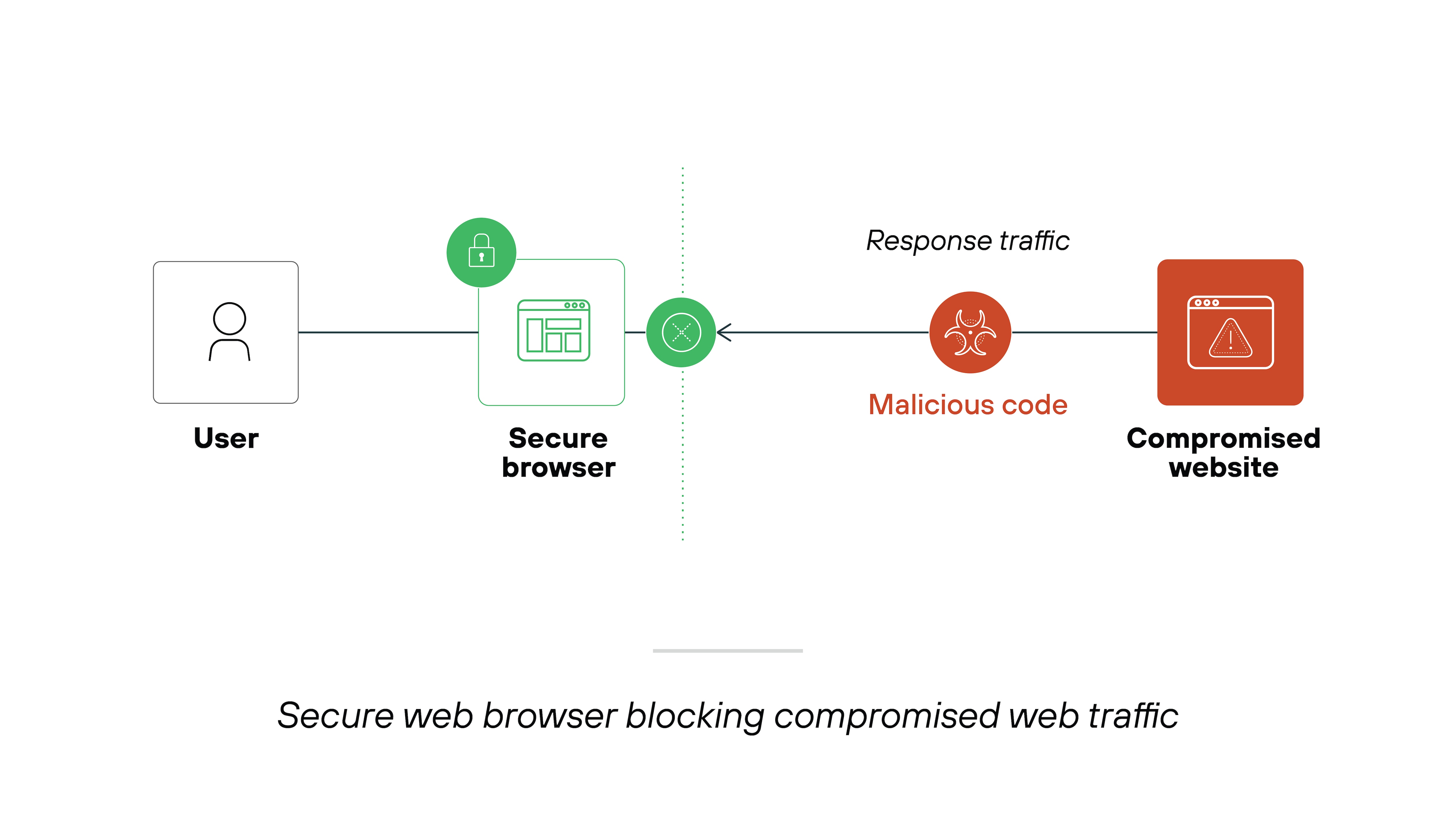
More specifically:
Granular controls make it easy for you to manage the content that can be accessed on your network. Which is also useful for compliance purposes.
Here are the web and SaaS app filtering features you should be looking for in a secure browser:
Capability to allow or block access or login to individual URLs and web pages based on content categories and applications
Control over which SaaS applications employees can access to prevent shadow IT
Safe browsing features based on a URL’s reputation
Note:
Organizations are increasingly adopting more comprehensive security solutions like zero trust, secure service edge (SSE), and secure access service edge (SASE). These frameworks offer better visibility into network activity, which is key to mitigating vulnerabilities and threats associated with traditional remote access methods.
By integrating more advanced security measures, organizations get a better grasp of possible security risks and how to manage them effectively.
By integrating more advanced security measures, organizations get a better grasp of possible security risks and how to manage them effectively.
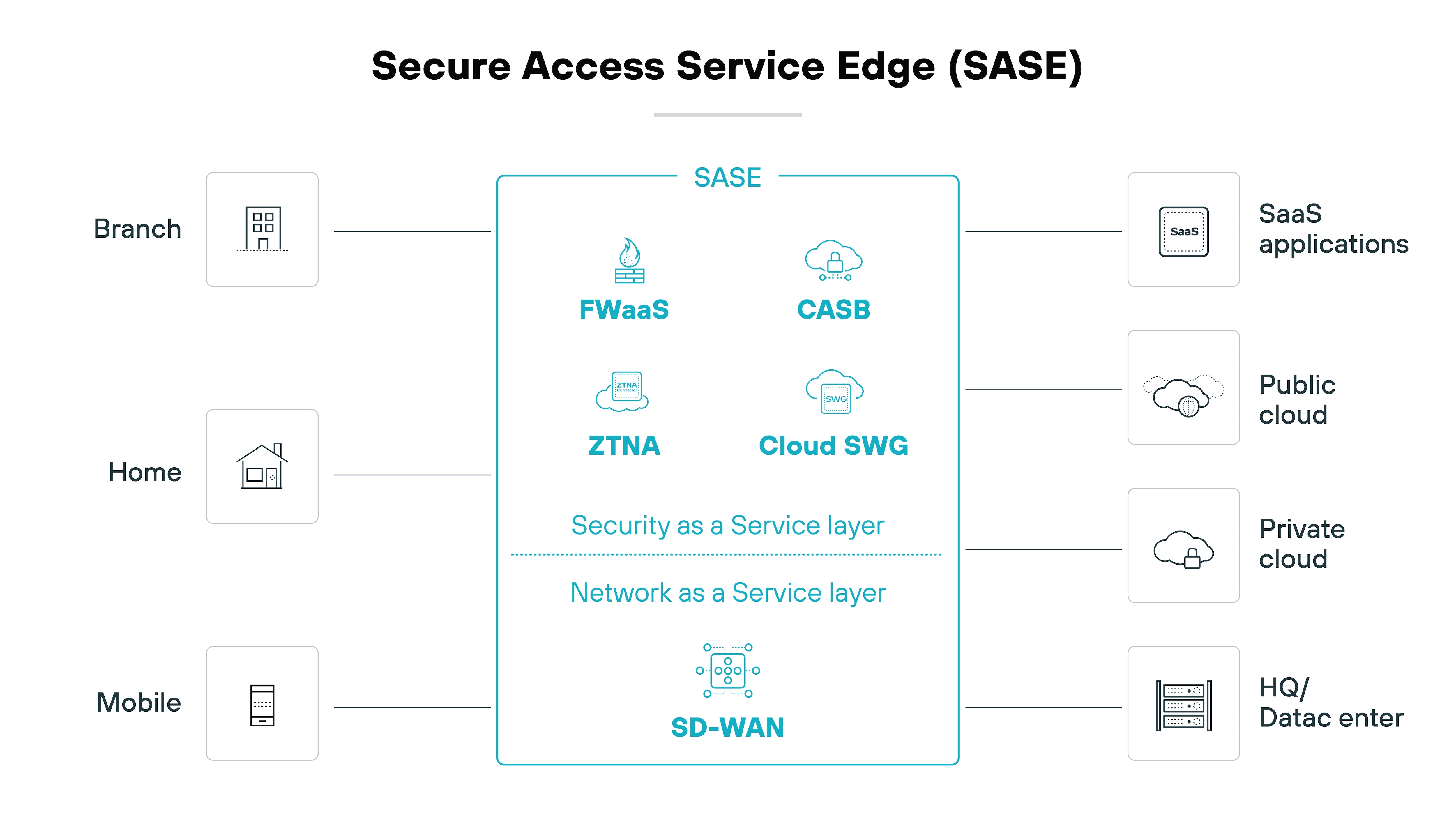
| Further reading: What Is SASE?
Data loss prevention (DLP)
When selecting a secure browser, keep in mind that protecting sensitive data against both external threats and internal misuse is crucial.
Data loss prevention (DLP) features play a key role in this. DLP ensures that data doesn’t leave the corporate network unintentionally or maliciously.
Look for DLP features that provide detailed, policy-based controls to fine-tune how users interact with URLs and enterprise applications. These controls help prevent data exfiltration by:
Limiting file downloads and uploads, which can stop sensitive information from being transferred outside the network
Blocking the ability to copy and paste sensitive information into websites, public AI tools and apps that are risky or not categorized, thereby protecting against data leaks
Preventing the printing of specific web pages or documents directly from the browser, which adds a layer of security against physical data breaches.
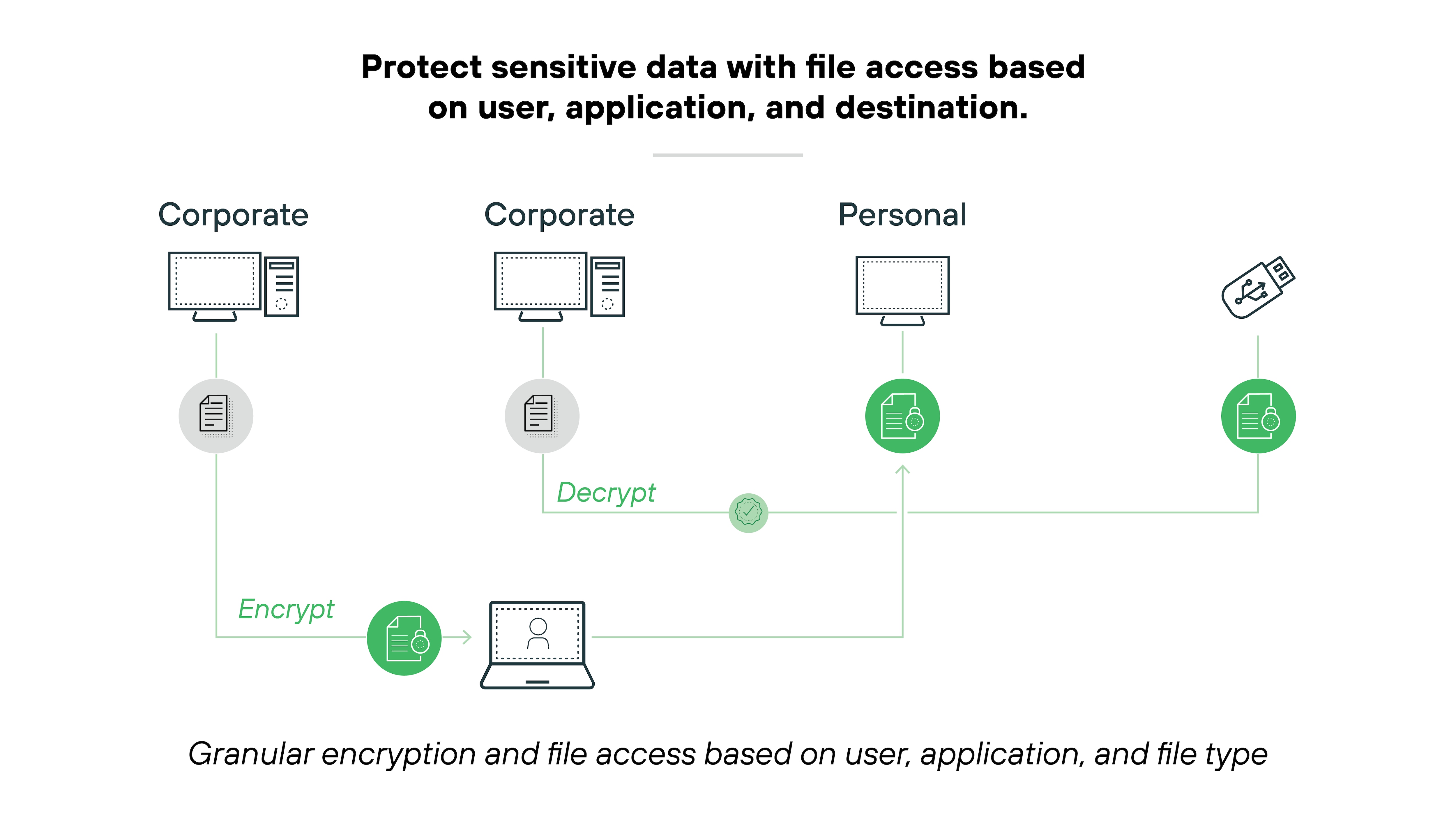
Plus—DLP features can extend to controlling physical hardware and software actions:
Restricting which printers can be used, e.g., preventing printing to home devices that may be less secure
Disallowing screenshots, screen sharing, and video recording from sensitive web pages, which helps maintain visual data security
Limiting access to cameras and microphones by specific websites and applications to avoid unauthorized audio or visual data capture
Adding watermarks to sensitive documents or specific web apps to trace data leakage and deter unauthorized sharing
Hiding or disabling certain web page elements to reduce the risk of exposure to sensitive information
Automatically masking sensitive data based on the user’s role, the device’s security posture, and the web application being used, ensuring that only authorized eyes see critical information
Encrypting files when downloaded to an endpoint to protect data at rest
Again, granular controls are necessary when it comes to enforcing a comprehensive security policy. Especially when we’re talking about the complex challenges of protecting data across a modern enterprise.
Detailed control mechanisms provide organizations with the tools necessary to manage how information is handled.
Device management
Choosing the right enterprise browser includes considering its capacity for effective device management. This is a need-to-have when it comes to streamlining IT and security operations.
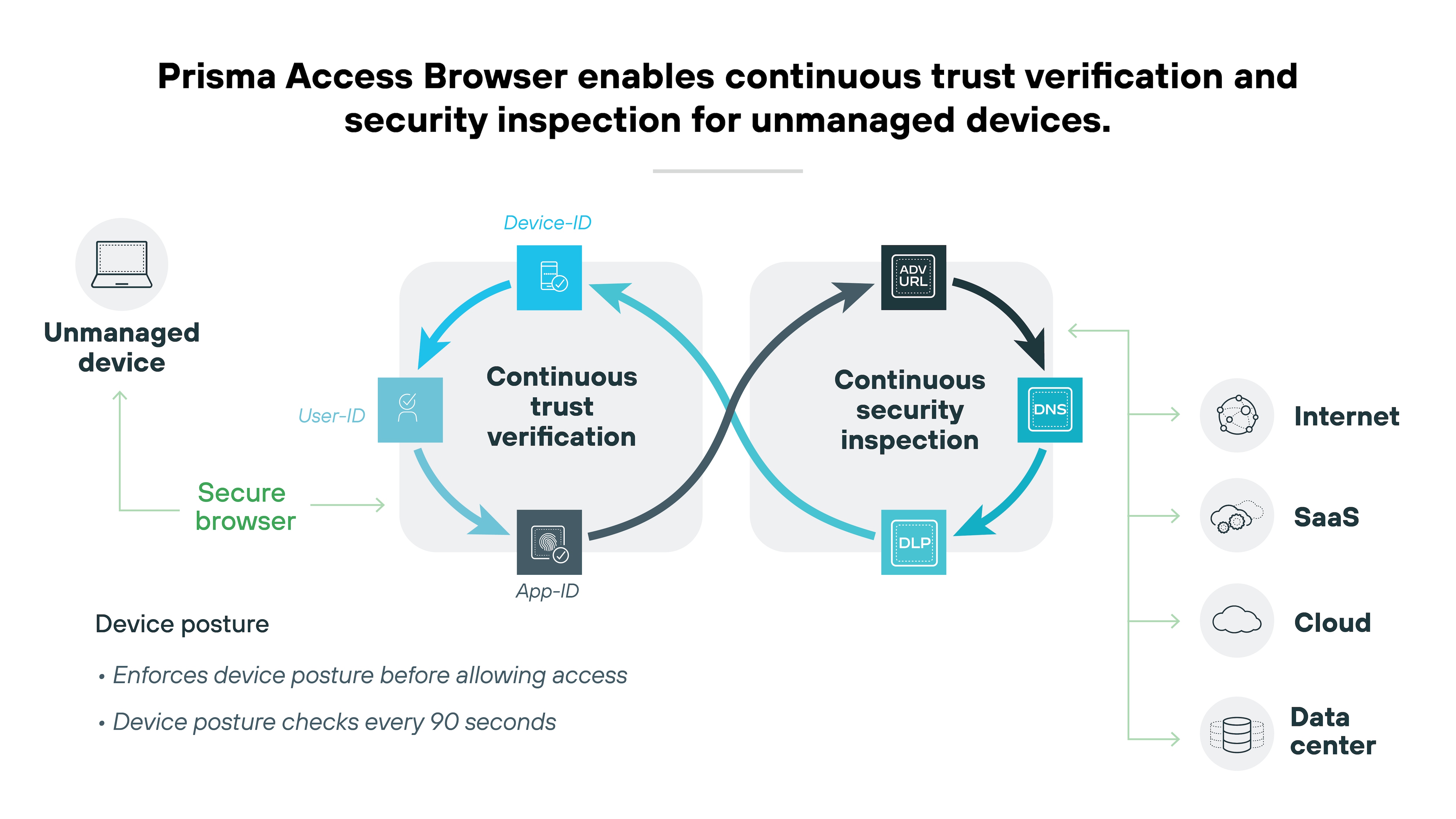
Ideally, your secure browser will provide a device directory that effectively works as a roster of your devices and device groups.
Like this:
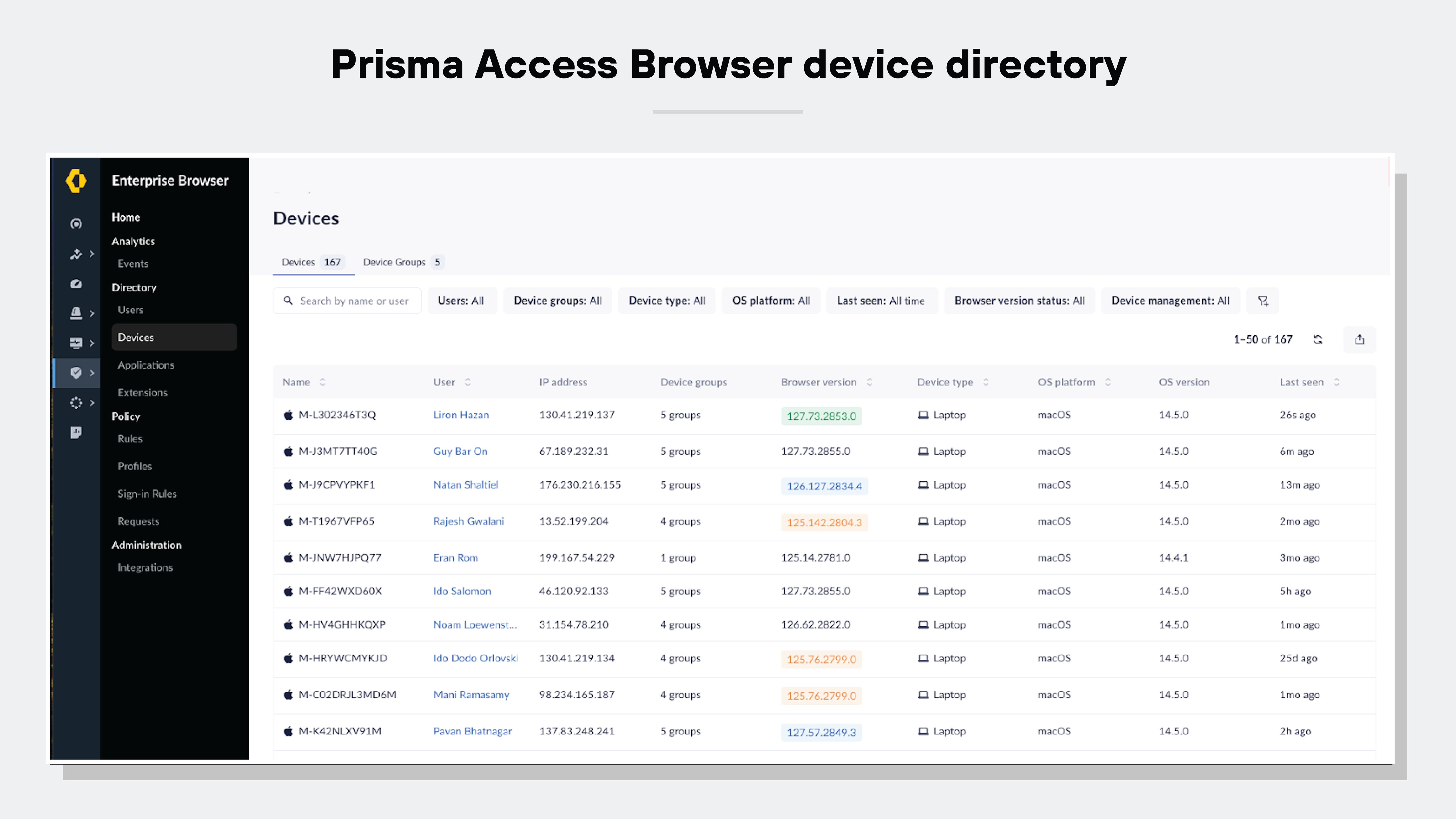
Here are the device management capabilities you’ll want to seek out in a secure browser:
Keeping a comprehensive inventory of all devices with the browser installed
Allowing quick revocation of access if a device is lost, stolen, or compromised
Assessing the security posture of each device
Enabling access control based on specific endpoint characteristics, such as the operating system in use, the version of installed patches, and any security software like endpoint protection platforms (EPP) and endpoint detection and response (EDR) systems.
Adopting a secure browser that comes with device management tools majorly improves SecOps and response strategies. You'll be able to make device management easier and more efficient--plus improve network security overall.
2. Usability and convenience
A secure browser has to provide a great user experience to be effective.
High-quality enterprise browser solutions are designed with the user in mind. Users should be able to enjoy ease of use from any device and location.
Ease of use matters in every organization, but it can be a deciding factor for small businesses that do not have the time or staff to manage a difficult rollout. A strong enterprise browser should be familiar for end users, fast to deploy, and simple to adopt across distributed teams, contractors, and bring-your-own-device environments.
Important:
A secure browser must provide a user-friendly workspace that simplifies remote work. This is essential for maintaining security and productivity.
Tip:
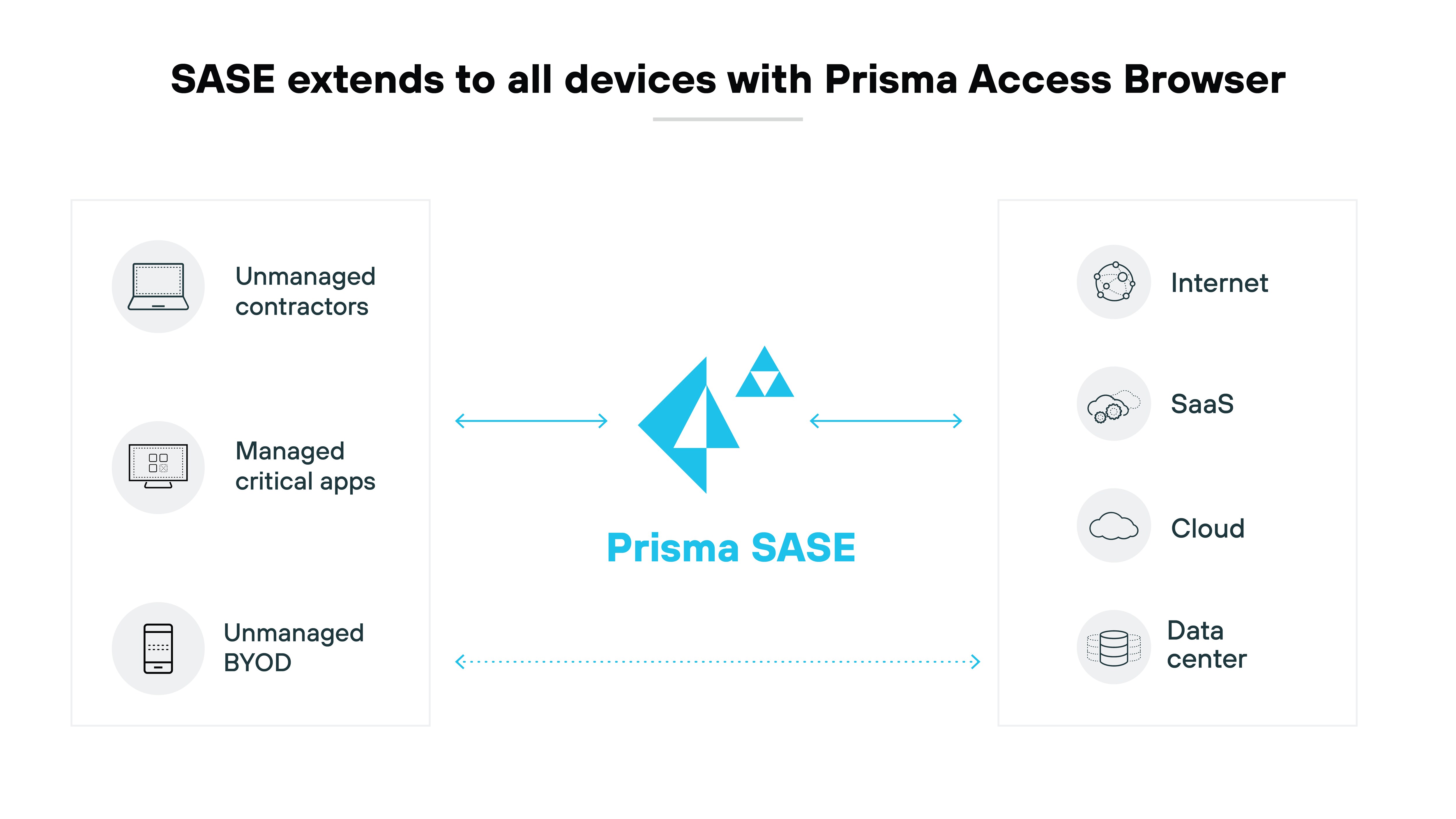
If your organization is focusing on agility and productivity, consider adopting a SASE-native secure browser. This will provide efficient, secure access to corporate resources.
Frictionless onboarding
Leading secure browser solutions make it easy to onboard new users, plus manage software distributions and updates.
Ideally, your secure browser should be able to integrate with existing device management platforms or use simple email setups. Which will majorly simplify IT management tasks related to software updates and security.
Familiarity
A secure browser should use Chromium to maintain the familiar look and feel users expect.
Using Chromium as its base helps the secure browser provide a smooth transition from common consumer browsers such as Chrome or Edge. It keeps the user interface, bookmarks, extensions, and the way web pages are displayed consistent, so everything feels familiar right away.
Seamless logon
Secure browsers should integrate smoothly with identity providers (IdPs) and Active Directory, facilitating single sign-on (SSO). That helps minimize password fatigue and user frustration. Not to mention, it streamlines access and makes the user’s browsing experience better.
Consistent experience across devices
A secure browser should sync user profiles across different devices to maintain a consistent experience. No matter if employees are in the office, using their own devices from home, or checking in from a mobile device while on the move, the functionality and interface should stay the same.
Convenience and productivity
An enterprise browser should enhance usability by supporting shortcuts and allowing users to import bookmarks and settings. Again, this adds up to a smoother transition for users.
It’s essential that the browser delivers high application performance and a seamless browsing experience. It’ll boost employee productivity without causing any delays or latency.
Tip:
Look for a secure browser that’s simple to distribute, install, upgrade, and use. Secure browsers that don’t burden help desk teams have far greater adoption rates and significantly fewer workaround attempts.
3. Centralized administration
The best enterprise browser options will offer a full suite of centralized administrative tools that make work easy for IT and SecOps teams. Centralized administration is important for large enterprises, but it is equally valuable for smaller organizations that need strong control with minimal day-to-day overhead.
Administrators should be able to manage policies, view device activity, revoke access quickly, and maintain visibility without adding operational burden.
Centralized administration tools should facilitate:
- New release distribution and updates
- User onboarding and offboarding
- User privileges management
- User activity monitoring
- Integration with existing IT systems and practice
To ensure a unified experience for both end users and administrators, the browser solution should offer single-pane-of-glass management across all deployments.
Let’s break down the key centralized administration features and capabilities you should look out for in detail:
Unified management
Unified management is essential for secure browser solutions. It allows administrators to effectively define and enforce security policies on a large scale.
Note:
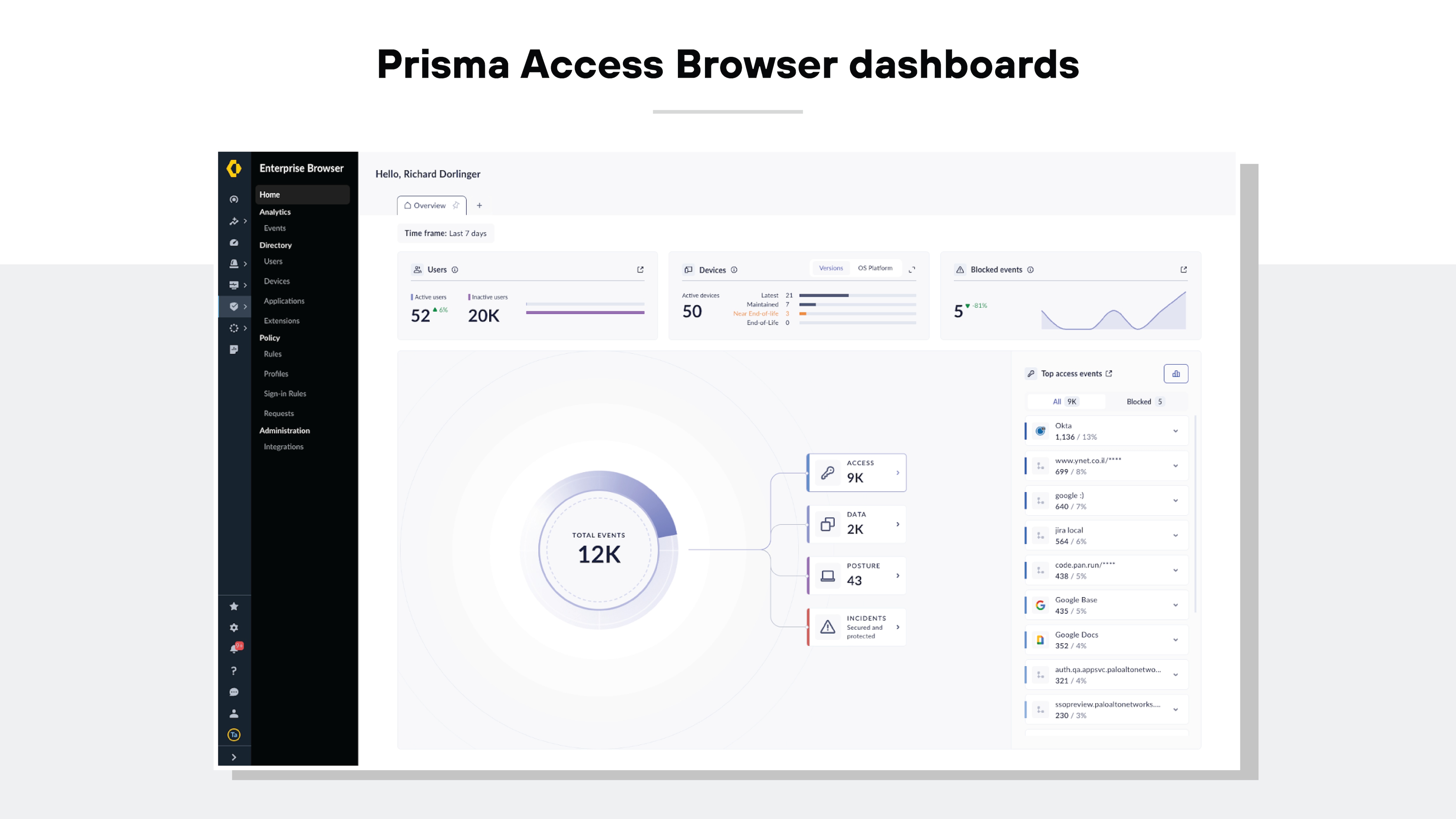
The most efficient secure browsers are often components of a comprehensive SASE framework rather than isolated tools.
Platform-oriented secure browser solutions should provide capabilities that include:
- Configuring detailed policies tailored to user, device posture, location, time, or network conditions
- Policy setting flexibility and user friendliness
- Implementing policies across users seamlessly, without causing disruption
- A robust policy engine that enables policies to be established once and applied across any device, whether it's a computer or mobile
- An integrated secure browsing experience that automatically transitions users from their regular browser to the secure browser for applications needing heightened security
Tip:
As you scale up the system to accommodate more use cases and users, don’t forget to assess the policy engine for its scalability and ease of use.
Visibility and analytics
A secure browser solution should come equipped with administrative tools that offer insights into user behavior. Not to mention, admin tools should allow security analysts to identify quick security risks quickly.
Visibility and analytics will help you maintain oversight and respond promptly to incidents.
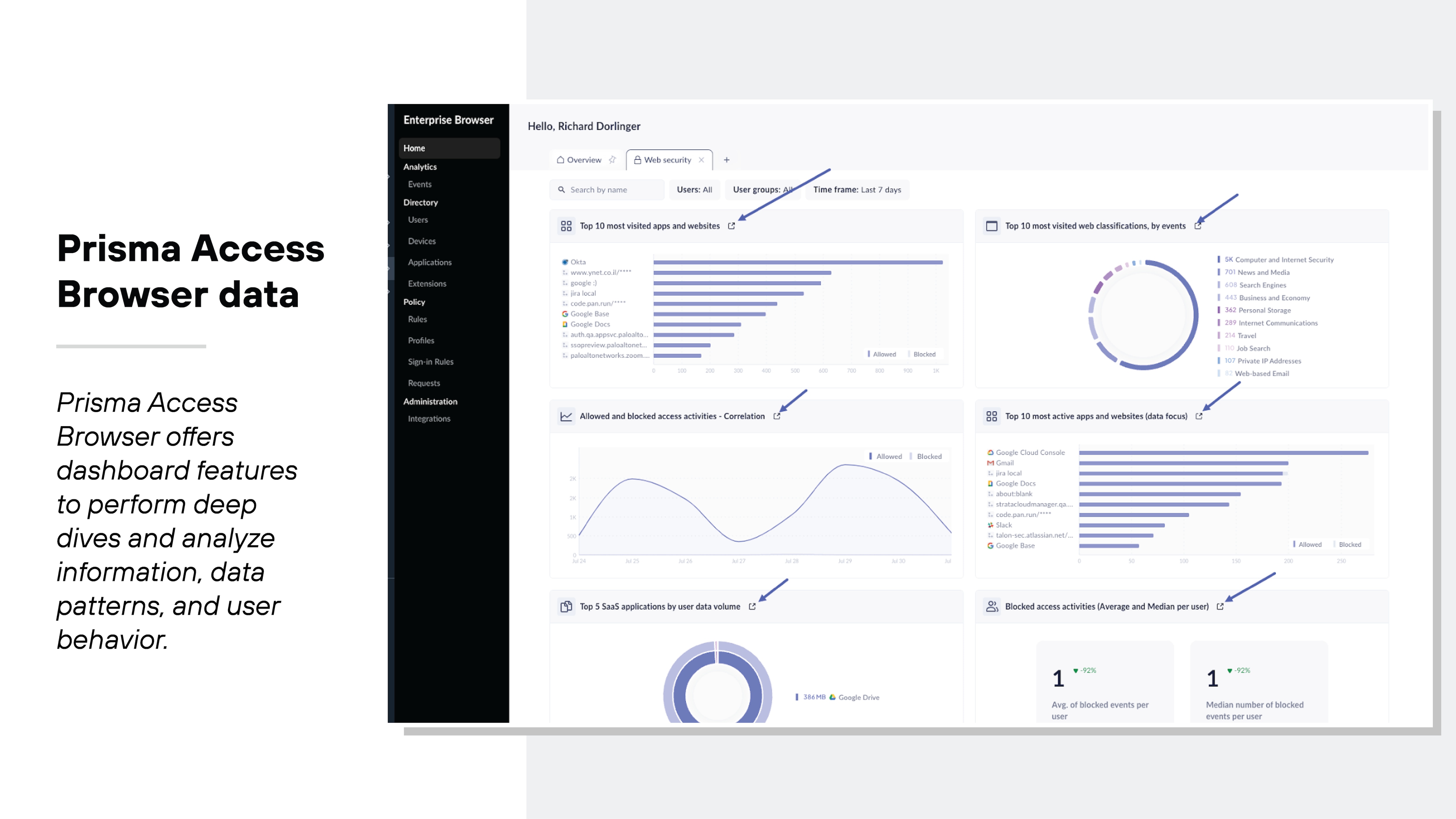
Here are some key visibility and analytics features to consider:
- Comprehensive reports and dashboards that give both an overview and detailed insights into user activities within the browser
- Web audit trails and session recordings that are crucial for forensic analysis and meeting general security and compliance demands
- Metrics that track the digital experience of users, including page load times, idle durations, and resource usage such as CPU and RAM
Software distribution and deployment methodologies
When selecting a secure browser, be sure that it accommodates various software distribution and deployment methods.
You’ll want the compatibility with existing endpoint software and configuration management systems. It’ll simplify the integration process and significantly reduce support needs.
A top-tier secure browser solution should offer:
- Compatibility with third-party software distribution frameworks, including Microsoft System Center Configuration Manager (SCCM) and Group Policy Objects (GPOs), along with unified endpoint management (UEM) and mobile device management (MDM) tools.
- Simple deployment options, like sending email invitations that do not require admin rights. This feature is crucial for external users like contractors and remote workers who may use personal, unmanaged devices.
Integration with your existing tech stack
Good secure browser solutions are engineered to protect and leverage your existing investments while minimizing barriers to adoption.
How to choose an enterprise browser vendor
When comparing vendors, look beyond feature lists. Consider how well the solution fits your organization’s size, operating model, and administrative capacity. For example, large enterprises may prioritize deep integrations and broad policy control, while small businesses may place more weight on deployment speed, BYOD support, AI controls, administrative simplicity, and cost efficiency.
Selecting the right vendor is crucial to the success of your secure browser implementation.
Choose an enterprise browser vendor who:
- Delivers the technical support your team requires
- Is highly regarded in independent industry evaluations (including feedback from customers and analysis by experts)
- Provides a secure browser that integrates seamlessly into SASE architecture
| Security features and capabilities | Usability and convenience features |
|---|---|
|
|
| Centralized administrative features and capabilities | Vendor |
|---|---|
|
|
Buyer Checklist: Evaluating An Enterprise Browser For SMBs
Even when evaluating an enterprise browser for a broader organization, these criteria can help identify solutions that are practical for smaller teams, remote users, contractors, and growing businesses with limited security resources.
| SMB Consideration | What To Look For |
|---|---|
| Ease | Fast deployment, familiar user experience, low-friction onboarding |
| Ai Controls | Controls for risky AI sites and protection against sensitive data leakage into AI tools |
| Byod | Strong protection and policy enforcement for unmanaged and personal devices |
| Admin Simplicity | Centralized visibility, policy management, access revocation, and reporting |
| Cost | Practical security value without unnecessary infrastructure or tool sprawl |
Even when evaluating an enterprise browser for a broader organization, these criteria can help identify solutions that are practical for smaller teams, remote users, contractors, and growing businesses with limited security resources.
An enterprise browser is a centrally managed Internet browser, distinct from consumer-managed browsers like Firefox, Safari, or Chrome. It secures access to business applications from unmanaged devices used by remote or hybrid workers and third parties, often replacing consumer browsers. This type of browser provides enhanced security, last-mile DLP, and detailed content and context-based controls.
Secure browsers deliver all the standard features of an enterprise browser, including visibility and access control, a seamless user experience, blocking unsafe activity, authentication, content and context-based controls, and last-mile DLP. Beyond the fundamental features, secure browsers also incorporate AI-powered security capabilities to defend the browser-based workspace.


