Search
Table of Contents
- Best Rapid7 Competitors & Alternatives
-
What Is Security Operations (SecOps)? Comprehensive Guide
- Security Operations (SecOps) Explained
- The Pillars of Modern SecOps: People, Process, and Technology
- Example Scenario: Incident Response to a Malware Alert
- Proactive Security Operations Examples
- Technology: Core Tools for the SOC
- Core Components and Functions of the SOC
- SecOps vs. DevOps vs. DevSecOps
- Security Operations FAQs
- What Is Identity Threat Detection and Response (ITDR)?
- Best Sumo Logic Competitors & Alternatives for 2026
- Best SOAR Tools for 2026: Compare 10 Leading Platforms
-
Mastering MTTR: A Strategic Imperative for Leadership
- Beyond "Repair": Other Meanings of MTTR
- Why Is MTTR Important for Cybersecurity?
- Understanding Key Cybersecurity Incident Metrics
- Key Components That Influence MTTR
- How to Measure MTTR Accurately
- MTTR Industry Benchmarks and Defining 'Good' Performance
- Tactics That Effectively Reduce Cybersecurity MTTR
- MTTR in Cloud and Hybrid Environments
- Executive-Level Reporting of MTTR
- Future of Cybersecurity MTTR
- Frequently Asked Questions
- What Is a Security Operations Center (SOC)?
- Security Operations Center (SOC) Roles and Responsibilities
- What is SOC as a Service (SOCaaS)?
- How Do I Improve SOC Effectiveness?
-
How AI-Driven SOC Solutions Transform Cybersecurity: Cortex XSIAM
- How Cortex XSIAM 2.0 Revolutionizes Security Operations
- Cortex XSIAM Solutions and Advantages
- Addressing Critical Issues in Current SOC Solutions
- How Cortex XSIAM Transforms the SOC
- Distinctive Features of Cortex XSIAM
- Comprehensive SOC Solutions: Single Platform Delivery Highlights
- Integrated Capabilities: The XSIAM Solutions Delivery
- Ready to Transform Your Cybersecurity Landscape?
How Do I Deploy SecOps Automation?
5 min. read
Table of Contents
To deploy SecOps automation effectively, the following steps should be followed to ensure a smooth and successful integration of Security Orchestration, Automation and Response (SOAR) into your existing operations:
- Assess your current security posture
- Define Objectives and Requirements
- Select the Right SOAR Platform
- Plan for Integration
- Build and Test Playbooks
- Train Your SecOps Team
- Deploy Gradually and Monitor
- Measure and Optimize
- Establish Ongoing Maintenance and Updates
Preparing for SecOps Automation
When preparing for SecOps automation, it's essential to consider the following steps that can help optimize the transition toward automation for both you and your organization:
Step 1: Understand Existing Policies and Processes
Evaluating your current policies and processes is crucial to identify areas that can be streamlined through automation. This includes understanding how incidents are currently handled and the manual steps involved in the process.
Step 2: Identify Daily Tools and Platforms
Take stock of the tools and platforms your team uses daily. Understanding the existing technology landscape and data sources is key to identifying potential integration points and areas where automation can have the greatest impact.
Step 3: Determine Key Stakeholders for Incident Resolution
Clarify who needs to be involved in resolving security incidents. This can include the security team and other relevant stakeholders within the organization.
Step 4: Standardize and Make Processes Repeatable
Consider standardizing your processes to ensure they are repeatable and consistent. This involves identifying areas where automation can bring consistency and reliability to security operations.
Step 5: Establish Policies and Procedure for Incident Assignment
How can you standardize your processes so they’re repeatable and consistent?
What are your policies and procedures around incident assignments?
How are you communicating incidents internally?
Evaluate How Incidents are Communicated Internally
Evaluating how incidents are communicated internally is crucial. Automating communication processes can help streamline information dissemination and improve response times.
Analyze Workflows
- Assess whether an expert is needed to interpret or triage the data and how automation can support or augment these tasks.
- Identify tasks in the workflow that are repeatable and standardizable, as these are prime candidates for automation.
- Determine whether automating a specific workflow will drastically speed up incident response and how this aligns with organizational goals.
- Consider whether human intervention is necessary for testing automated workflows and the level of involvement needed during the implementation phase.
TIP: It is important to clearly define the scope to facilitate resource allocation, determine the necessary skill sets, and ensure the team receives adequate training for the automation initiative.
Start Simple with High-Impact Tasks
To begin the automation journey, organizations should focus on tasks that offer significant value and are straightforward to automate. It is best to start with repetitive tasks such as collecting information, generating sandbox reports, sending communications out to users, running queries across various tools, and coordinating with other teams. Assigning an owner to each task ensures accountability and steady progress.
Organizations should consider:
- Are there tasks that consume a lot of time within a larger workflow?
- Are there tasks that could disrupt operations if they are overlooked?
It is essential to prioritize automating these smaller, high-impact tasks before attempting to automate an entire workflow from start to finish.
Starting with prebuilt playbooks and integrations is advisable for those without coding expertise. Solutions like Cortex XSOAR offer a wide range of ready-made playbooks that cover everyday use cases. Its visual editor makes it easy to customize these playbooks without coding. Building blocks like entity enrichment, indicator blocking, and hunting playbooks can be reused across multiple scenarios, quickly delivering value to security operations.
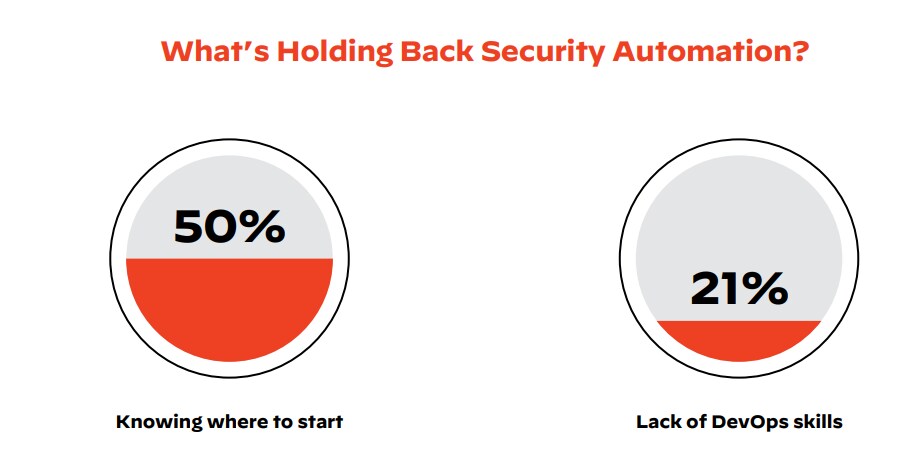
Ease Into Cybersecurity Automation
Adopt a step-by-step approach—the crawl-walk-run method—to build confidence in cybersecurity automation gradually. Start small with basic tasks and progressively automate more complex processes as you become familiar with the platform.
Selecting the right tool is critical when implementing security orchestration, automation, and response (SOAR) solutions. Begin with a Proof of Concept (PoC) to validate the benefits of automation in a controlled setting. Use the PoC to test specific tasks, like alert triage or threat detection, and gather insights for broader deployment.
Develop and test automation playbooks to define actions for different security events. Start by automating repetitive tasks, such as data enrichment or alert correlation, and integrate these playbooks with your existing security tools.
As your team gains confidence, gradually expand automation to cover more complex workflows, moving towards end-to-end security operations automation. This measured approach helps optimize processes and fully leverage the benefits of cybersecurity automation.
Automation Benefits for Organizations of All Sizes
Automation provides significant advantages to organizations of all sizes, from small businesses to large enterprises. While mature security processes can enhance automation efforts, they are optional for getting started. Smaller organizations, in particular, can benefit by automating routine tasks to free up resources for more complex challenges.
Organizations should begin by leveraging out-of-the-box playbooks and integrations to automate straightforward, repetitive tasks. As teams build experience and confidence, they can gradually advance to automating full workflows and more complex use cases. This phased approach ensures that automation delivers maximum value at every stage, regardless of the organization's size or maturity level.
Benefits of Consistent Automated Workflows
Automated workflows guarantee consistent outputs by following the same processes every time. This uniformity standardizes responses and accelerates onboarding new security operations center (SOC) analysts by embedding best practices directly into playbooks.
Consistent workflows also simplify the replacement of point products, reducing operational downtime. Whether or not automation is in place, well-documented and standardized security processes are essential for enhancing team efficiency and managing incidents effectively.
Peer Review and Approval
Peer review is a critical step in ensuring the effectiveness of your use cases. By involving colleagues and other teams in your organization, you can identify issues and missed steps, leading to improved automation.
Managerial Approval and Production Deployment
Before deploying your automated workflows into production, they should undergo managerial approval. Consider a development-to-production workflow and track time-sensitive tasks as needed. Determine if service-level agreements (SLAs) should be tracked for follow-ups or remediation actions.
Managerial Approval and Production Readiness
Before deploying automated workflows in a production environment, they should undergo managerial review and approval. Implement a development-to-production workflow that includes tracking time-sensitive tasks and consider whether service-level agreements (SLAs) need to be monitored for follow-up actions or remediation.
Defining Incident Closure Criteria
Clearly establish the criteria for when an incident is considered closed, and ensure this is incorporated into your automation playbooks. If incidents are closed on external systems, include this as a final step. Identify points in the workflow where an analyst may need to intervene and make decisions, and build these decision points into the automation process.
Secure a Champion for Automation
While starting small can deliver quick wins that justify initial investments, achieving meaningful digital transformation in your SOC requires strong stakeholder support. Successful XSOAR users who transform their SOCs dedicate resources to empowering their teams, driving automation initiatives, and identifying key areas where automation can serve as a strategic business enabler. Gaining a champion within your organization helps build momentum, secure necessary buy-in, and sustain long-term progress in your automation journey.
Invest in SecOps Automation Training
Investing in cybersecurity automation training is necessary for organizations navigating today’s rapidly evolving digital landscape. As traditional, manual approaches to cybersecurity become increasingly inadequate, security professionals must be equipped with the skills and knowledge to leverage the benefits of automation fully.
Automation provides significant advantages, including:
- Faster threat detection and response
- Enhanced accuracy
- Reduced human error
- Decreased overall workload for cybersecurity teams
This is particularly critical given the widening skills gap in cybersecurity. With a shortage of qualified professionals, automation helps alleviate the resource strain by enabling existing staff to handle a broader range of tasks more efficiently and effectively, thereby preventing burnout and maximizing productivity.
What Is Automation?
“It's a very hard thing to answer. I mean, obviously it’s taking care of something automatically—but [it doesn’t] live in any one place. And that’s what makes it hard to answer. So, a lot of people think about, you know, the alert pipeline or the IR [incident response] process as a very linear stage of steps, right? Automation plays a role in that, in multiple places ... And then we’re also automating processes in and around the SOC itself so certain procedures are being handled behind the scenes and don’t need to be handled by our SOC analysts. That can be governance or audit-related, notifications and alerts of, you know, program or platform health. Automation to us generally is in service of expediting the time to resolve and increasing the clarity and confidence we have in the conclusions that we reach.”
- Kyle Kennedy, Senior Staff Security Engineer, Palo Alto Networks
Defining Automation Use Cases
Clear and well-defined use cases are essential for effective automation. This process begins by identifying repetitive tasks, understanding critical business processes, and pinpointing specific pain points where automation can deliver the most value.
Engage Stakeholders and Analyze Data
Involve key stakeholders across departments, such as security, operations, and compliance teams, to provide input on existing processes and identify areas ripe for automation. Analyze data to prioritize use cases based on their potential impact and ease of integration.
Consider Security and Compliance Requirements
Evaluate each use case's security and compliance implications. Select automation tools that align with the organization's regulatory requirements and security standards, ensuring the solution meets operational and compliance needs.
Design and Test Prototypes
Develop and test prototypes to validate the feasibility of each use case. Calculate the return on investment (ROI) by assessing the potential time savings, cost reductions, and efficiency gains. Use these insights to create a roadmap for full-scale implementation.
Document Use Cases and Optimize Continuously
Maintain thorough documentation for each use case, outlining objectives, processes, and expected outcomes. Continuously monitor the performance of automated workflows, making adjustments as needed to optimize effectiveness and maintain alignment with organizational goals.
Defining automation use cases is about strategically identifying where automation can improve efficiency and effectiveness while ensuring alignment with organizational goals and compliance requirements. This structured approach helps ensure that automation initiatives produce tangible benefits and contribute to overall operational excellence.
Preventing Scope Creep with Clear Use Case Definitions
To avoid scope creep—a common challenge in automation projects—it is vital to establish a clear and precise definition for each use case. This involves setting specific objectives and boundaries from the outset, such as automating incident response for targeted threats like phishing emails. A well-defined use case scope keeps automation efforts focused, manageable, and effective, preventing unnecessary complexity and feature additions.
Moreover, a clear scope allows for better risk assessment and management. By understanding the boundaries of each use case, potential risks can be identified early, and mitigation strategies can be planned accordingly.
This approach helps prevent the unintended introduction of security vulnerabilities or compliance issues, ensuring that automation enhances rather than compromises the organization's security posture.
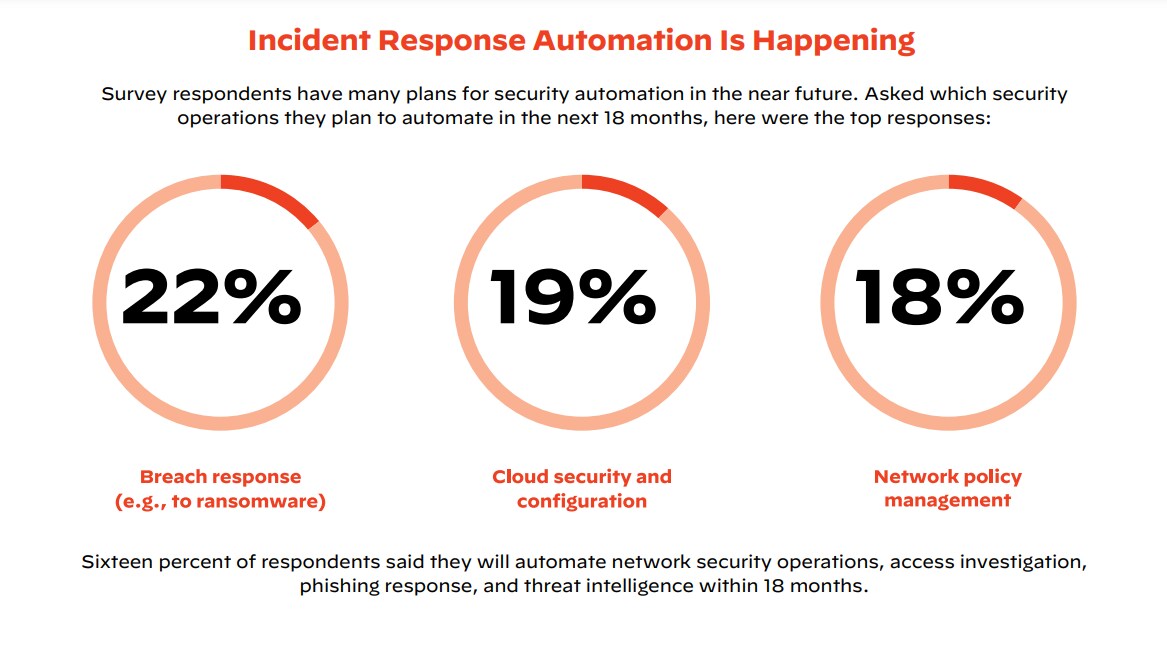
Example Use Cases: Phishing and Malware
Phishing and malware are two of the most prevalent security threats, making them ideal starting points for developing automation use cases. Organizations can customize playbooks for these scenarios to address their specific requirements, using them as templates for building tailored solutions.
Insight: According to the 2022 Unit 42 Incident Response Report, 77% of intrusions are suspected to originate from three primary access vectors: phishing, exploitation of known software vulnerabilities, and brute-force credential attacks — primarily targeting remote desktop protocol (RDP).
Utilizing the Cortex XSOAR Marketplace
The Cortex Marketplace offers over 1,000 content packs of prebuilt playbooks and integrations with security and non-security tools used in the SOC. These resources are crafted from extensive research, practical experience, customer feedback, and usage data, providing a wide range of options likely to meet your organization’s needs.
The Cortex Marketplace content is continuously updated to reflect emerging industry trends and user feedback. By sharing insights and experiences, organizations can contribute to the evolution of security automation, helping to shape future tools and playbooks that address the latest threats and challenges.
Selecting the Right SOAR Platform
Choosing the right SOAR platform is crucial for achieving efficient security automation. The ideal platform should enable quick implementation with ready-to-use playbooks and support scalability as your organization’s security needs evolve. This includes integrating advanced capabilities such as threat intelligence and seamlessly orchestrating workflows across your entire security toolset, various functional teams, and distributed networks.
Additionally, the platform should integrate with external threat intelligence sources to provide real-time visibility into threats, helping your organization stay ahead of emerging risks.
How Cortex XSOAR Simplifies Life for SecOps Teams
- Accelerates Incident Response: Cortex XSOAR reduces incident response times by replacing repetitive, low-level manual tasks with automated processes. This speeds up response, improves accuracy, and boosts analyst satisfaction.
- Standardizes and Scales Processes: By providing step-by-step, replicable workflows, security automation helps standardize processes for incident enrichment and response, ensuring a consistent quality of response and the ability to scale efficiently.
- Unifies Security Infrastructure: Cortex XSOAR is a central hub, connecting previously disparate security tools and products. This unified approach allows analysts to manage incident response from a single, integrated console.
- Increases Analyst Productivity: With low-level tasks automated and processes standardized, analysts can focus on higher-value activities, such as threat hunting and planning future security strategies, rather than getting bogged down in routine tasks.
- Leverages Existing Investments: By automating repetitive actions and minimizing the need to switch between multiple consoles, Cortex XSOAR maximizes the value of your existing security investments and enhances coordination among different tools.
- Streamlines Incident Handling: Automation streamlines incident management by integrating with key IT service management (ITSM) tools like ServiceNow, Jira, and Remedy, as well as communication platforms like Slack. This accelerates incident handling and resolution by automatically distributing incidents to the appropriate stakeholders based on predefined incident types.
- Improves Overall Security Posture: These benefits contribute to a stronger overall security posture, reducing security risks and potential business impacts.
SOAR Deployment and Use Cases FAQs
A SOAR platform collects data and can take automated actions to remediate threats and/or send alerts to security teams with contextual security information to support human intervention. Some SIEM systems only collect data and send alerts but do not automate remediation.
Other tools commonly found deployed alongside a SOAR platform include security information and event management (SIEM), endpoint detection and threat response (EDTR), cloud access security broker (CASB), and user and entity behavior analytics (UEBA).
SOAR platforms integrate with existing security tools through APIs and pre-built connectors. The steps typically include:
- API Configuration: Setting up API connections between the SOAR platform and security tools (e.g., SIEM, firewalls, endpoint protection).
- Connector Deployment: Deploying and configuring connectors that facilitate data exchange and command execution between tools.
- Custom Integrations: Custom integrations may be developed using the SOAR platform’s scripting and API capabilities for tools that do not have pre-built connectors.
Common challenges in SOAR deployment include:
- Integration Complexity: Mitigated by thorough planning, using standardized APIs, and leveraging vendor support.
- Workflow Design: Overcome by involving experienced security analysts in defining and testing workflows.
- Change Management: Addressed through comprehensive training and clear communication with stakeholders.
- Scalability: Ensured by selecting a scalable SOAR platform and gradually expanding its use.
- Data Quality: Improved by ensuring accurate and consistent data input from integrated tools.
The success of a SOAR deployment can be measured using several key metrics:
- Reduction in Response Times: Measure the decrease in time taken to detect, investigate, and respond to incidents.
- Increased Incident Handling Capacity: Track the incidents handled before and after deployment.
- Workflow Efficiency: Evaluate the effectiveness and efficiency of automated workflows.
- User Satisfaction: Gather feedback from security analysts and stakeholders on the SOAR platform's usability and impact.
- ROI (Return on Investment): Calculate cost savings from reduced manual effort and improved incident response efficiency.
- Analyst Retention: Helping prevent analyst burnout by providing a better work-life balance and opportunities for career development with the ability to focus on complex and critical tasks.
These metrics help to quantify the improvements and justify the investment in a SOAR platform.


