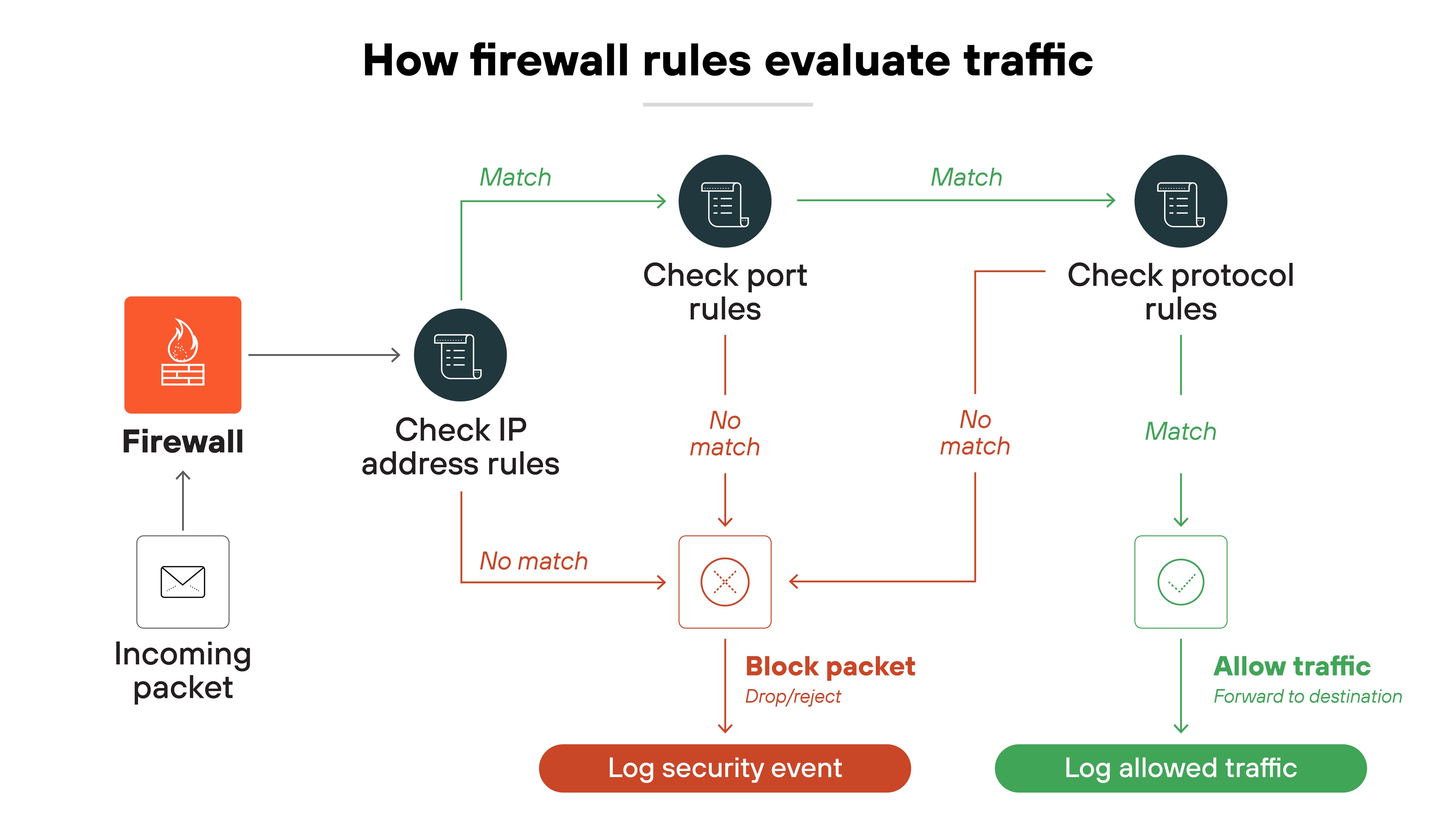
Firewalls act as barriers between private and external networks, checking and filtering data based on set security rules. Using these rules, firewalls decide if they should allow, block, or drop the data to protect the network.
Form factors include hardware, software, or a mix of both. This process ensures only safe, legitimate traffic gains entry.
What do firewalls do, and how do they work?
"A firewall acts a lot like a secretary for your network. The firewall examines requests for access to your network, and it decides whether they pass a reasonableness test. If so, they are allowed through, and, if not, they are refused entry."
Their job is to protect network devices (also referred to as hosts). That can mean computers, servers, or anything else with an IP address.
Basically, firewalls filter traffic to determine what should be allowed and what should be blocked.
To break it down further, a firewall uses rules to make those decisions. Rules can be based on IP addresses, protocols, ports, or other packet-level details. If a packet violates the rules, the firewall blocks it.
More advanced firewalls don't just look at packets one by one. Instead, they use stateful inspection, which means they track the entire session that a packet belongs to. That way, they can understand if packet behavior is expected or unusual.
Like this:
This matters because looking at the full context helps detect more complex or stealthy threats.
Firewalls also rely on threat intelligence. They compare traffic against databases of known malicious signatures. If a match is found, the firewall blocks the traffic.
They also treat traffic differently based on direction.
North-south traffic comes from outside the network and is more likely to carry threats, so it's inspected closely. East-west traffic moves within the network and is often overlooked—but if attackers get in, they can use it to move laterally.
Which is why inspecting internal traffic matters too.
Not to mention:
Firewalls help enforce access control. Most organizations today follow the principle of least privilege so that users and devices only get access to what they need. No more, no less. It's one of the most effective ways to limit risk.
Not all firewalls work the same way. Some protect individual devices. Others monitor traffic for an entire network.
Some are physical appliances. Others run in the cloud.
That's why they're generally categorized based on what they protect, how they're deployed, where they sit in the
network, or how they inspect traffic.
Below, we'll break down the main types of firewalls across each of these categories:
Types of firewalls
Category
Type
Description
Systems protected
Network firewall
Protects an entire network by inspecting incoming and outgoing traffic.
Host-based firewall
Installed on a specific device to monitor traffic to and from that host.
Form factors
Hardware firewall
A physical device placed between network elements and connected devices.
Software firewall
A software-based firewall deployed on servers or virtual machines. Includes container firewalls,
virtual firewalls, and managed service firewalls.
Placement within infrastructure
Perimeter firewall
Placed at the edge of a network to manage traffic entering or leaving.
Internal firewall
Positioned within the network to monitor traffic between internal segments.
Distributed firewall
A scalable approach where enforcement is applied across multiple devices.
Hybrid mesh firewall
Firewalls deployed across on-premises and cloud environments in a coordinated, distributed
architecture.
Data filtering method
Packet filtering firewall
Checks each packet against rule sets and allows or blocks based on criteria.
Stateful inspection firewall
Tracks the state of active connections to evaluate traffic in context.
Circuit-level gateway
Verifies session-level connections before allowing ongoing communication.
Proxy firewall
Intercepts and evaluates application-layer traffic between client and server.
Next-generation firewall (NGFW)
Combines traditional firewall features with advanced capabilities like IPS and traffic decryption.
Web application firewall
Filters HTTP traffic to and from web apps to block attacks like cross-site scripting or SQL
injection.
These distinctions aren't just technical trivia. They reflect how firewalls have adapted to different layers,
architectures, and threats.
Knowing the differences helps you make sense of where each firewall fits and what problems it's designed to solve.
Firewalls aren't just a set-it-and-forget-it technology. They need to keep up with evolving threats, shifting traffic patterns, and changing business needs.
One of the first challenges is choosing the right type of firewall for each environment. Whether that's a data center, public cloud, branch, or hybrid setup. From there, the real work begins.
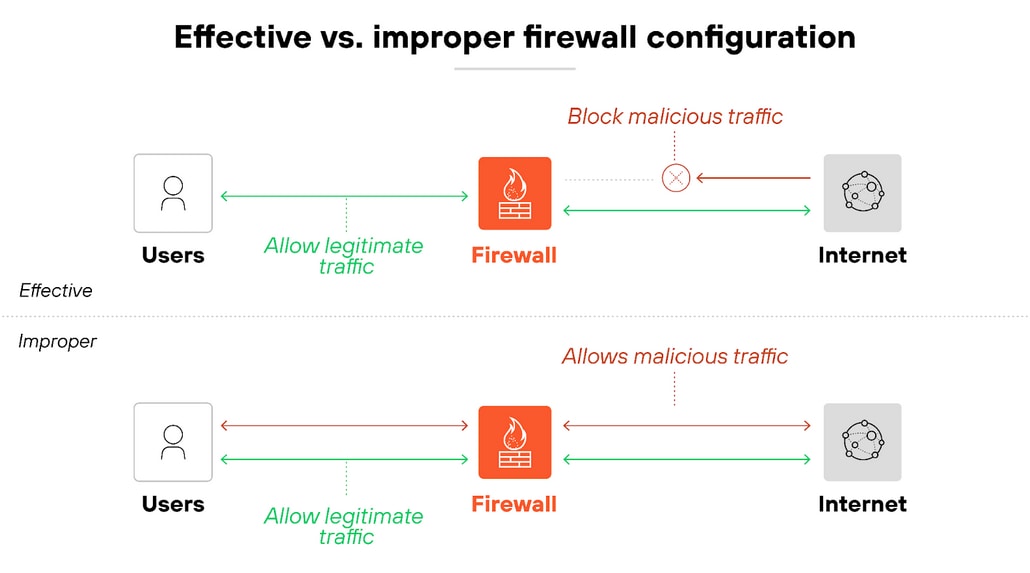
Misconfigurations are one of the most common and dangerous issues. Whether it's overly permissive rules, missing updates, or traffic filtering mistakes that leave gaps or create bottlenecks.
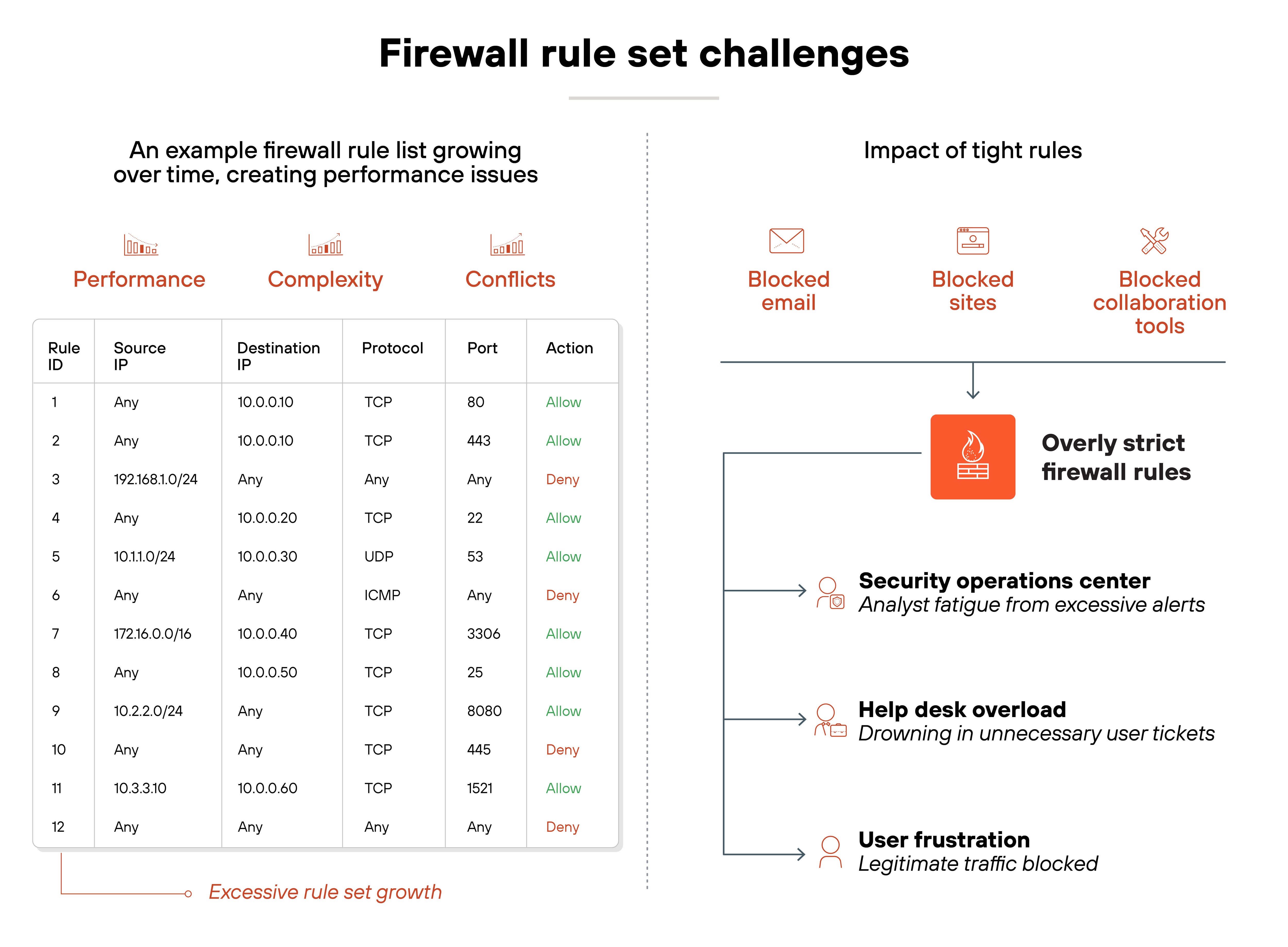
Plus, firewall rule sets grow over time. New policies get added, but old ones often remain. That leads to bloated configurations that slow performance, create conflicts, or block legitimate traffic. And tight rules can also cause false positives, which frustrates users and overloads IT teams with unnecessary alerts.
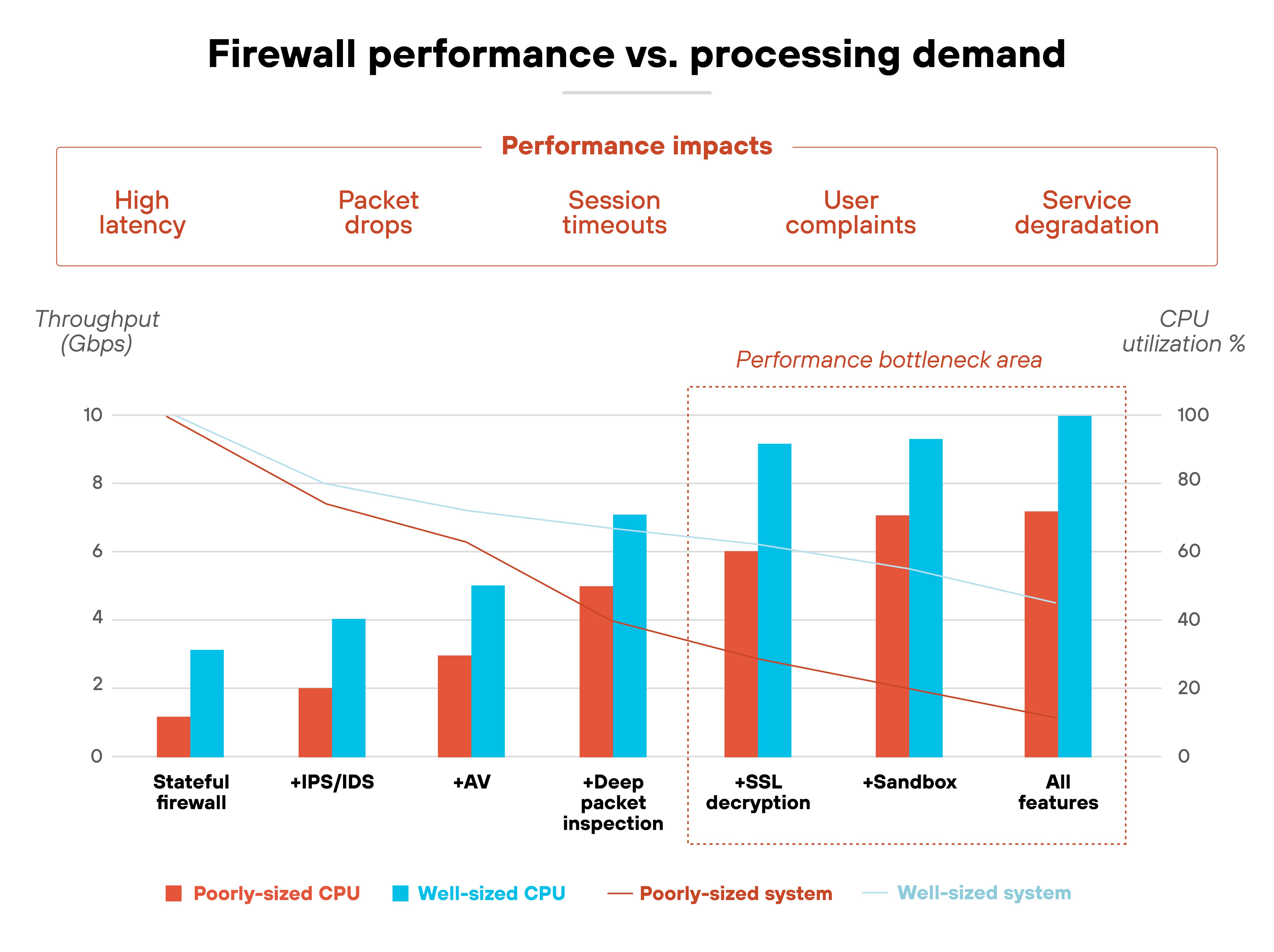
Meanwhile, performance demands continue to rise. Deep inspection, encrypted traffic analysis, and advanced features all require processing power. If firewalls aren't properly sized or tuned, throughput suffers.
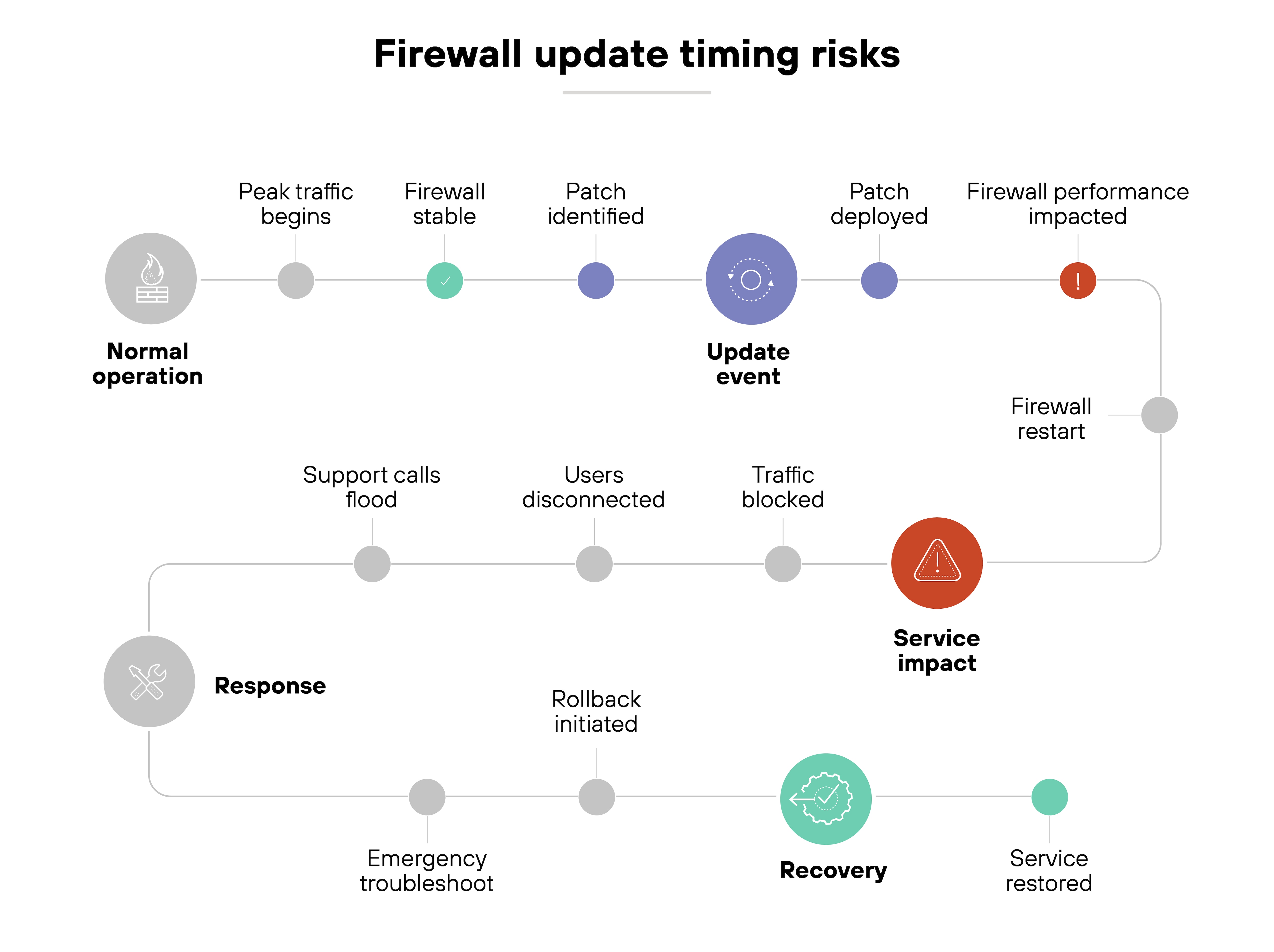
Even updates present risks. Regular patches and threat signature updates are critical. But poorly timed changes can disrupt traffic or introduce new issues.
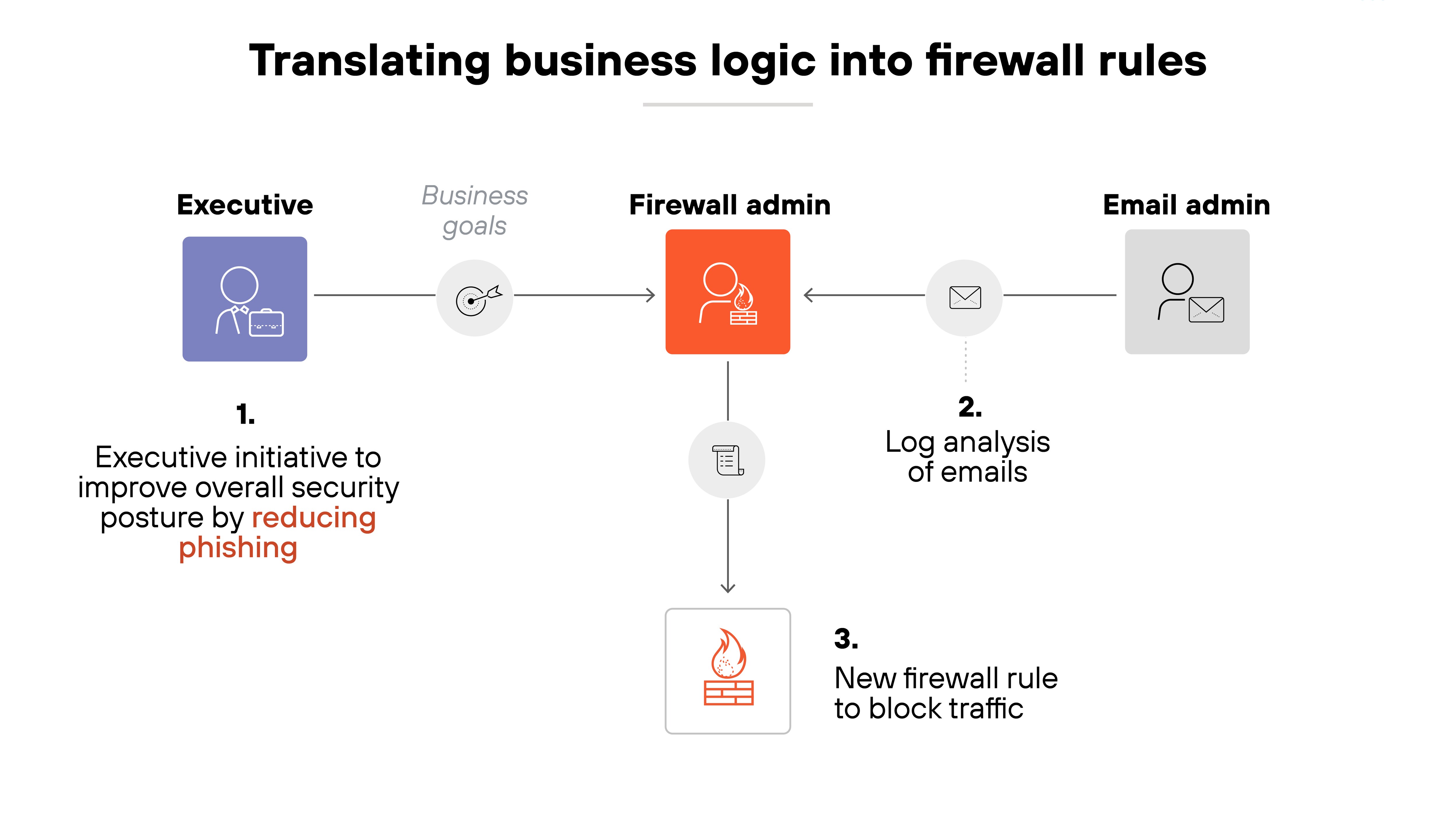
And underlying it all is one consistent challenge: translating business needs into clear, effective firewall rules. That's especially hard during infrastructure changes, when visibility is limited and documentation may be incomplete.
Bottom line:
Firewall management is an ongoing process. It takes constant tuning, review, and adaptation to keep protections strong without slowing the business down.
How do firewalls compare with other network security technologies?
Firewalls are often one of the first tools people think of when it comes to network security. But they're far from the only one.
From antivirus to web gateways to access control lists, each tool in the stack plays a distinct role. And while many overlap or integrate with firewalls, they aren't interchangeable.
Understanding the differences helps clarify what a firewall does—and doesn't—do. It also helps you spot where it fits in a layered defense strategy.
The table below breaks down how firewalls compare to other common technologies across five dimensions: purpose, deployment, traffic visibility, control, and overlap.
Firewalls vs. other network & security technologies / functions
Technology
Antivirus
IDS
IPS
NGFW
UTM
Proxy server
SWG
VPN
WAF
Router
ACL
Primary function
Scans and removes known malware from endpoints
Monitors traffic for suspicious activity
Detects and blocks known attacks
Inspects traffic using application, user, and content context
Combines firewall, antivirus, and intrusion prevention
Forwards traffic through an intermediary server
Filters outbound web traffic based on policy
Encrypts traffic for secure remote access
Filters HTTP traffic to web apps and blocks exploits
Directs traffic between networks
Controls access by specifying which traffic is allowed
Level of control
Endpoint-level
Network-level monitoring only
Network-level blocking
Deep, contextual inspection and enforcement
Moderate control with basic unified enforcement
Traffic relay with optional filtering
Policy-based access to internet content
Tunnel-level encryption and access control
Application-level filtering
Basic routing decisions
Packet-level filtering
Traffic visibility
Scans local files and memory
Observes traffic for anomalies
Analyzes known exploit patterns
Full visibility into traffic, including encrypted data
Moderate visibility
Limited unless combined with logging/monitoring
URL-level visibility and categorization
Limited visibility into application traffic
Full HTTP/S traffic inspection
No inspection
No inspection
Deployment scope
Device-level
Inline or passive network sensor
Inline, often combined with IDS
Network-wide, hybrid environments
All-in-one perimeter devices
Edge or cloud-based
Cloud-based or appliance
Client or gateway-based
Perimeter or cloud-based
Physical or virtual appliance
Integrated into routers/firewalls
Common use case
Protecting individual devices from malware
Alerting on suspicious network behavior
Blocking known network-based attacks
Centralized security policy enforcement
Simplified security for SMBs
Hiding user IP, filtering traffic
Blocking malicious or non-compliant web access
Securing remote workforce
Protecting web apps from OWASP threats
Routing LAN/WAN traffic
Enforcing basic network security rules
Strengths
Detects and removes file-based malware
Detects unknown threats via heuristics or behavior
Stops known exploits in real time
Application-aware, identity-based control
Easy deployment with broad protection
Anonymity, content caching, filtering
URL filtering, DLP, malware prevention
Secure tunneling, remote access
Shields web apps, prevents common attacks
Simple traffic direction
Explicit rule control, lightweight
Limitations
Can't stop network-based threats
Doesn't block traffic by itself
Needs tuning to avoid false positives
Complexity, resource-intensive
Performance, limited advanced control
Doesn't inspect deeply by default
Limited to web traffic
Doesn't inspect traffic content
Limited to web app layer
Not security-focused
Easily misconfigured or bypassed
No single tool can secure an entire environment. But knowing how firewalls interact with the rest of the security stack makes it easier to design defenses that are both complementary and complete.
A firewall monitors network traffic to allow or block data based on security rules. It inspects packets and sessions to stop unauthorized access or threats and protects network devices from malicious traffic.
A firewall blocks unauthorized access, known threats, and suspicious traffic. It filters data between internal and external networks and protects against both perimeter breaches and internal lateral movement.
A firewall monitors and filters network traffic based on security rules. It uses stateful inspection to assess packets in context and helps block or allow data based on risk.
Yes. Firewalls are essential for both individuals and organizations to block threats, protect data, and maintain secure access across home and business networks.
Firewall selection depends on what you're protecting—entire networks or individual devices—and where it’s deployed. Options include hardware, software, host-based, or network-based firewalls, based on traffic type and filtering needs.
Firewalls are used to secure networks by controlling incoming and outgoing data, allowing safe traffic while blocking malicious or unauthorized access.
Hardware firewalls resemble rack-mounted devices with ports and lights. Software firewalls appear as interfaces for managing rules and traffic. Appearance varies by type and scale.
Examples include network and host-based firewalls, hardware or software firewalls, perimeter or internal placement, and traffic inspection types like NGFWs, proxy firewalls, or WAFs.
A proxy relays traffic between users and external services. A firewall filters and blocks traffic based on policies. Both enhance security but serve different roles.